


dns over https configuration issue

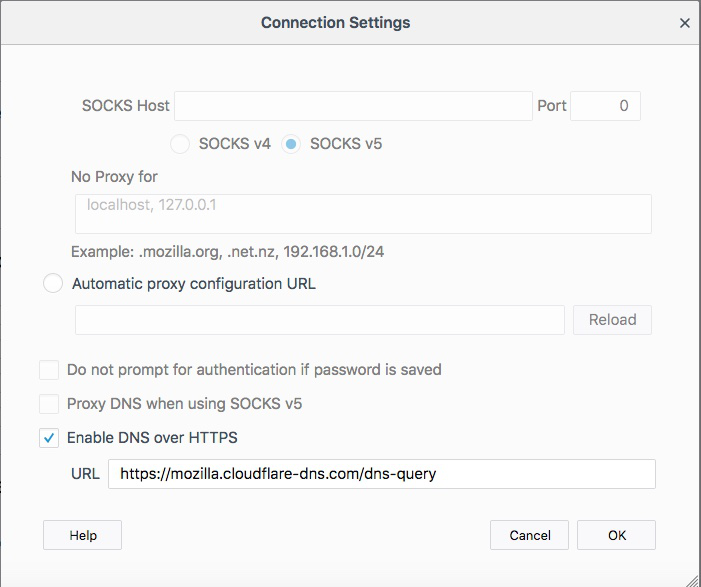
If I place in the /general/network settings/ -Enable DNS over https the value of "https://mozilla.cloudflare-dns.com/dns-query" and place a fake DNS server IP on my workstations DNS such as 100.100.100.100 (not a DNS server) as apposed to 8.8.8.8 should Firefox be able to resolve network sites?
I had this configuration initially and it worked then stopped today Nov-26-2018. See below configuration from firefox and cloudflares "https://cloudflare-dns.com/help/" test.

Zgjidhje e zgjedhur
I have found a solution. DNS over https ddoes not rely on the workstations local DNS as long as network.trr.mode is set to a value of 3. If network.trr.mode is set to 2 you cannot tell as it will fal back to your hosts DNS if a resolution failure occurs
Lexojeni këtë përgjigje brenda kontekstit 👍 0Krejt Përgjigjet (2)
mace2 said
If I place in the /general/network settings/ -Enable DNS over https the value of "https://mozilla.cloudflare-dns.com/dns-query" and place a fake DNS server IP on my workstations DNS such as 100.100.100.100 (not a DNS server) as apposed to 8.8.8.8 should Firefox be able to resolve network sites? I had this configuration initially and it worked then stopped today Nov-26-2018. See below configuration from firefox and cloudflares "https://cloudflare-dns.com/help/" test.
I have noticed that firefox 63.03 will no long resolve requests immediately after a clear history of all components is performed. Is this a known bug?
Zgjidhja e Zgjedhur
I have found a solution. DNS over https ddoes not rely on the workstations local DNS as long as network.trr.mode is set to a value of 3. If network.trr.mode is set to 2 you cannot tell as it will fal back to your hosts DNS if a resolution failure occurs