


Windows 10 reached EOS (end of support) on October 14, 2025. If you are on Windows 10, see this article.

Kërkoni te Asistenca

Shmangni karremëzime gjoja asistence. S’do t’ju kërkojmë kurrë të bëni një thirrje apo të dërgoni tekst te një numër telefoni, apo të na jepni të dhëna personale. Ju lutemi, raportoni veprimtari të dyshimtë duke përdorur mundësinë “Raportoni Abuzim”.

Mësoni Më Tepër

Discovered a Firefox bug when uploading images to WordPress media library; an image won't show up on my website or in WordPress if viewing with Firefox

  • 1 përgjigje
  • 1 e ka hasur këtë problem
  • 61 parje
  • Përgjigjja më e re nga o-o--LOKI--o-o
  • Arkivuar

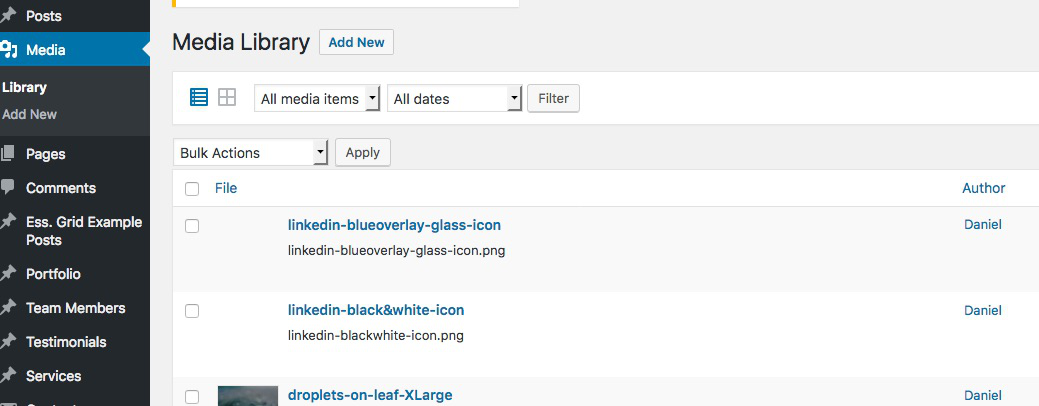
While working on my web site I noticed a PNG image was broken not just on my site but also in the Revolution Slider development plugin where I was working with the image. (I've been working on my site all week and the image was fine until today.) I got "broken icon" links in both places. The image looked fine in my media library so I deleted it and re-uploaded the same image but got the same results: no thumbnail showed up in the library next to the image and I still got broken links if I tried to reuse it. So... I re-saved the PNG image from the original photoshop file thinking it was somehow corrupted but nope... that image wouldn't show in my slider or my library either, even though I could EDIT it in my media Library. I haven't added any new add-ons today to account for this. I also cleared my caches numerous times with no luck fixing it.

Decided on a whim to use Chrome and was able to successfully upload the original file that I assumed was corrupted. I re-attached it to my slider and it shows up fine now in WordPress and on my live site.

Here's the kicker: after re-uploading with Chrome, I went back to Firefox to see if the issue persisted and sure enough, I can't see the image in WordPress OR on my website. So basically the image is now completely disappearing using Firefox. Below is what the image looks like listed in my library. I tried uploading two different files but got the same results with both, thus the two blank entries.

Any thoughts anyone?
While working on my web site I noticed a PNG image was broken not just on my site but also in the Revolution Slider development plugin where I was working with the image. (I've been working on my site all week and the image was fine until today.) I got "broken icon" links in both places. The image looked fine in my media library so I deleted it and re-uploaded the same image but got the same results: no thumbnail showed up in the library next to the image and I still got broken links if I tried to reuse it. So... I re-saved the PNG image from the original photoshop file thinking it was somehow corrupted but nope... that image wouldn't show in my slider or my library either, even though I could EDIT it in my media Library. I haven't added any new add-ons today to account for this. I also cleared my caches numerous times with no luck fixing it. Decided on a whim to use Chrome and was able to successfully upload the original file that I assumed was corrupted. I re-attached it to my slider and it shows up fine now in WordPress and on my live site. Here's the kicker: after re-uploading with Chrome, I went back to Firefox to see if the issue persisted and sure enough, I can't see the image in WordPress OR on my website. So basically the image is now completely disappearing using Firefox. Below is what the image looks like listed in my library. I tried uploading two different files but got the same results with both, thus the two blank entries. Any thoughts anyone?
Foto të bashkëngjitura ekrani

Ndryshuar nga o-o--LOKI--o-o

Krejt Përgjigjet (1)

Addendum: I tried up loading other files to the Library using Firefox to see if I could duplicate the issue. Most files were uploaded fine but some had the same issue where they just wouldn't show up anywhere.