How do I enable the built-in pdf viewer and stop Firefox from using Acrobat Reader?

Firefox stopped displaying PDF's and now only allows me to save them. I want to view PDF's in the browser again.
Thank you.
Zgjidhje e zgjedhur
Hi, please try the following:
- Click the menu button
 and choose Options.
- Select the Applications panel on the left.
- Check "Preview in Firefox" is set for "Portable Document Format (PDF)" -- if not, change it to this.
See View and edit PDF files using Firefox’s built-in viewer for a screenshot of what this page looks like.
If it is already set to that and it still won't load with the built-in viewer, please let us know. Thanks!
Lexojeni këtë përgjigje brenda kontekstit 👍 3Krejt Përgjigjet (3)
Zgjidhja e Zgjedhur
Hi, please try the following:
- Click the menu button and choose Options.
- Select the Applications panel on the left.
- Check "Preview in Firefox" is set for "Portable Document Format (PDF)" -- if not, change it to this.
See View and edit PDF files using Firefox’s built-in viewer for a screenshot of what this page looks like.
If it is already set to that and it still won't load with the built-in viewer, please let us know. Thanks!
Thanks! This solved my problem!

Qantas94Heavy said
If it is already set to that and it still won't load with the built-in viewer, please let us know. Thanks!
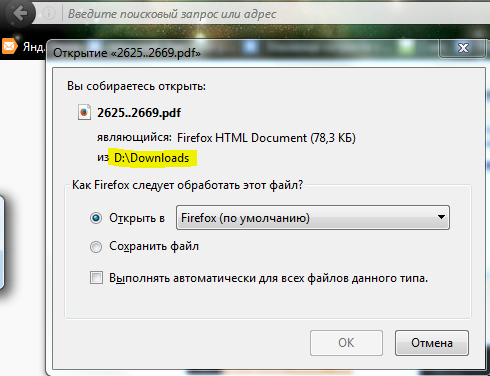
I let you know that it doesn't work for me because it already was like that and instead of show me PDF itself Firefox tries to download it.
You know what's funny is here? That this problem only happens when I try to open ALREADY DOWNLOADED PDF! With pdf's location as link it works fine. But as soon as I try to open saved PDF... I get this stupid thing!
Already disabled all addons. This kinda pisses me off.