


Why am I getting strange icons to open a related page.

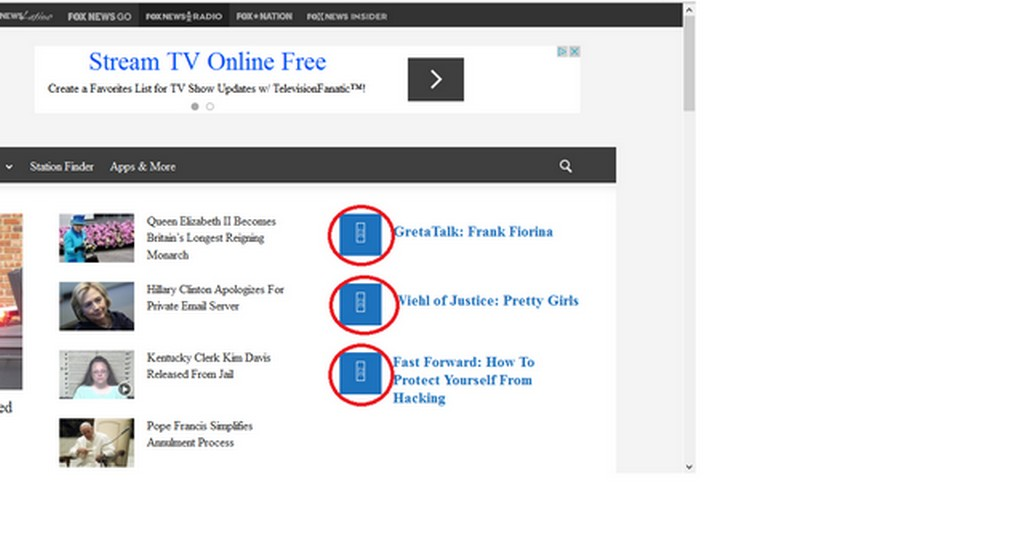
On any page that I open which has options to go to or other pages to open, I am not getting the usual icon to click on. In their place I'm getting a rectangular box with two letters and two numbers inside the box. How do I get the regular icons to click on? I've made a screen shot and circled the boxes in red.
Krejt Përgjigjet (1)
Missing icons are usually supplied by a font that is downloaded from the server (@font-face) as you might see by little boxes that show the hex code of the characters instead. If you have a font installed that covers this Unicode range then you may see a real (CJK) character and not the little box with the CSS code.
Make sure that you allow pages to choose their own fonts.
- Tools > Options > Content : Fonts & Colors > Advanced: [X] "Allow pages to choose their own fonts, instead of my selections above"
You can check the gfx.downloadable_fonts.enabled pref on the about:config page and make sure that it is set to true (if necessary double-click the line to toggle its value).
You can open the about:config page via the location/address bar. You can accept the warning and click "I'll be careful" to continue.