


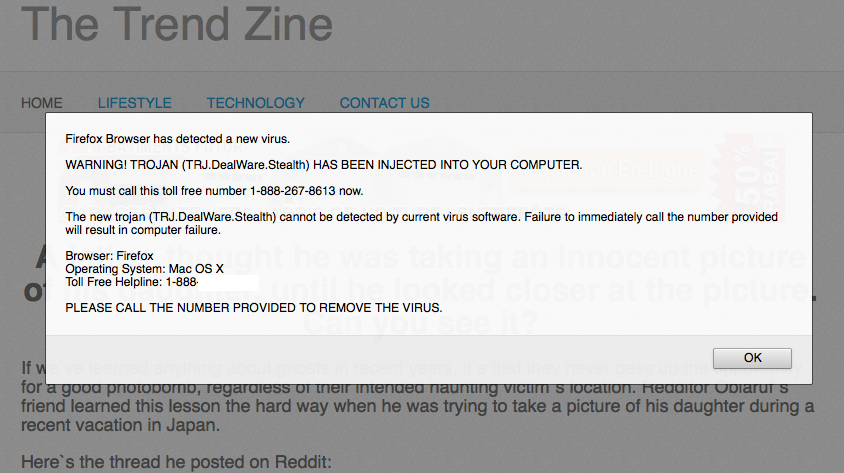
warning trojan (trj.dealware.stealth) has been injected into your computer - this popped up in my Mac OS Xis it fake?

It also says: Firefox Browser has detected a new virus. AND: Failure to immediately call the number provided will result in computer failure. The phone number is 1-888-***-****.
edit: removed malicious number. (philipp)
Ndryshuar nga philipp
Zgjidhja e Zgjedhur
Thanks, should I remove the link from the previous question? Or will you?
Krejt Përgjigjet (14)
Why is the number removed? Shouldn't it stay up as a warning?
hello, it's good that you asked, but this is a clear scam. we don't want to advertise this number!
could you go to the firefox menu ≡ > help ? > troubleshooting information, copy the contents of that page and paste them here into a reply on the forum? this might give us a clue what is going on...
I'm sorry but I shut down my Mac and I am on my iPad. If I powered up my computer would I be able to retrieve that info?
yes, this was to see what extensions you have installed to make sure that this kind of pop-up was only opened by a website and not something malicious that is already active on your system.
{
 "application": {
   "name": "Firefox",
   "version": "38.0.5",
   "buildID": "20150525141253",
   "userAgent": "Mozilla/5.0 (Macintosh; Intel Mac OS X 10.9; rv:38.0) Gecko/20100101 Firefox/38.0",
   "updateChannel": "release",
   "supportURL": "https://support.mozilla.org/1/firefox/38.0.5/Darwin/en-GB/",
   "numTotalWindows": 1,
   "numRemoteWindows": 0,
   "remoteAutoStart": false
 },
 "crashes": {
   "submitted": [],
   "pending": 0
 },
 "modifiedPreferences": {
   "browser.cache.disk.smart_size.first_run": false,
   "browser.cache.disk.smart_size.use_old_max": false,
   "browser.cache.disk.capacity": 358400,
   "browser.cache.frecency_experiment": 2,
   "browser.download.importedFromSqlite": true,
   "browser.places.smartBookmarksVersion": 7,
   "browser.sessionstore.upgradeBackup.latestBuildID": "20150525141253",
   "browser.startup.homepage_override.mstone": "38.0.5",
   "browser.startup.homepage_override.buildID": "20150525141253",
   "dom.mozApps.used": true,
   "extensions.lastAppVersion": "38.0.5",
   "media.gmp-gmpopenh264.lastUpdate": 1432105797,
   "media.gmp-gmpopenh264.version": "1.4",
   "media.gmp-manager.lastCheck": 1434226724,
   "media.gmp-manager.buildID": "20150525141253",
   "network.cookie.prefsMigrated": true,
   "network.predictor.cleaned-up": true,
   "places.database.lastMaintenance": 1434220593,
   "places.history.expiration.transient_current_max_pages": 100664,
   "plugin.importedState": true,
   "plugin.disable_full_page_plugin_for_types": "application/pdf",
   "print.print_plex_name": "",
   "print.print_margin_top": "0.5",
   "print.print_paper_width": "  8.50",
   "print.print_orientation": 0,
   "print.print_to_file": false,
   "print.print_scaling": "  1.00",
   "print.print_unwriteable_margin_right": 25,
   "print.print_paper_height": " 11.00",
   "print.print_command": "",
   "print.print_reversed": false,
   "print.print_unwriteable_margin_left": 25,
   "print.print_evenpages": true,
   "print.print_unwriteable_margin_bottom": 56,
   "print.print_resolution_name": "",
   "print.print_duplex": 1515870810,
   "print.print_paper_size_unit": 0,
   "print.print_margin_right": "0.5",
   "print.print_oddpages": true,
   "print.print_bgcolor": false,
   "print.print_colorspace": "",
   "print.print_bgimages": false,
   "print.print_downloadfonts": false,
   "print.print_margin_left": "0.5",
   "print.print_shrink_to_fit": true,
   "print.print_unwriteable_margin_top": 25,
   "print.print_paper_name": "",
   "print.print_margin_bottom": "0.5",
   "print.print_in_color": true,
   "print.print_paper_size_type": 1,
   "print.print_page_delay": 50,
   "print.print_paper_data": 0,
   "print.print_resolution": 1515870810,
   "privacy.sanitize.timeSpan": 0,
   "privacy.sanitize.migrateFx3Prefs": true,
   "storage.vacuum.last.places.sqlite": 1432105923,
   "storage.vacuum.last.index": 1
 },
 "lockedPreferences": {},
 "graphics": {
   "numTotalWindows": 1,
   "numAcceleratedWindows": 1,
   "windowLayerManagerType": "OpenGL",
   "windowLayerManagerRemote": true,
   "adapterDescription": "",
   "adapterVendorID": "0x10de",
   "adapterDeviceID": "0x 863",
   "adapterRAM": "",
   "adapterDrivers": "",
   "driverVersion": "",
   "driverDate": "",
   "webglRenderer": "NVIDIA Corporation -- NVIDIA GeForce 9400M OpenGL Engine",
   "info": {
     "AzureCanvasBackend": "quartz",
     "AzureSkiaAccelerated": 0,
     "AzureFallbackCanvasBackend": "none",
     "AzureContentBackend": "quartz"
   }
 },
 "javaScript": {
   "incrementalGCEnabled": true
 },
 "accessibility": {
   "isActive": false,
   "forceDisabled": 0
 },
 "libraryVersions": {
   "NSPR": {
     "minVersion": "4.10.8",
     "version": "4.10.8"
   },
   "NSS": {
     "minVersion": "3.18.1 Basic ECC",
     "version": "3.18.1 Basic ECC"
   },
   "NSSUTIL": {
     "minVersion": "3.18.1",
     "version": "3.18.1"
   },
   "NSSSSL": {
     "minVersion": "3.18.1 Basic ECC",
     "version": "3.18.1 Basic ECC"
   },
   "NSSSMIME": {
     "minVersion": "3.18.1 Basic ECC",
     "version": "3.18.1 Basic ECC"
   }
 },
 "userJS": {
   "exists": false
 },
 "extensions": [],
 "experiments": []
}
I hope that was what you were looking for. It was accessed via Facebook which took me to this site The Trend Zine http://thetrendzine.com/trending/02c-dad-takes-scary-picture.php
Ndryshuar nga philipp
thank you - so your system is in the clear. this malicious site is just showing that same fraudulent popup to each visitor.
Zgjidhja e Zgjedhur
Thanks, should I remove the link from the previous question? Or will you?
i've unlinkified that url for you :))
Cheers!
Hi, I have the same problem before, and I searched the internet and fix this trj.dealware.stealth pop-up. You can search <removed> for the solution. Hope this may help you.
Ndryshuar nga James
This thread was about a Mac OSX user who got a popup making a false claim and not a Windows user being infected by it.
Ndryshuar nga James
coolcollins said
Hi, I have the same problem before, and I searched the internet and fix this trj.dealware.stealth pop-up. You can search <removed> for the solution. Hope this may help you.
Ndryshuar nga James
Again this thread was by a Mac OSX user and not Windows and please stop trying to spam that blog.