


Settings Glitch

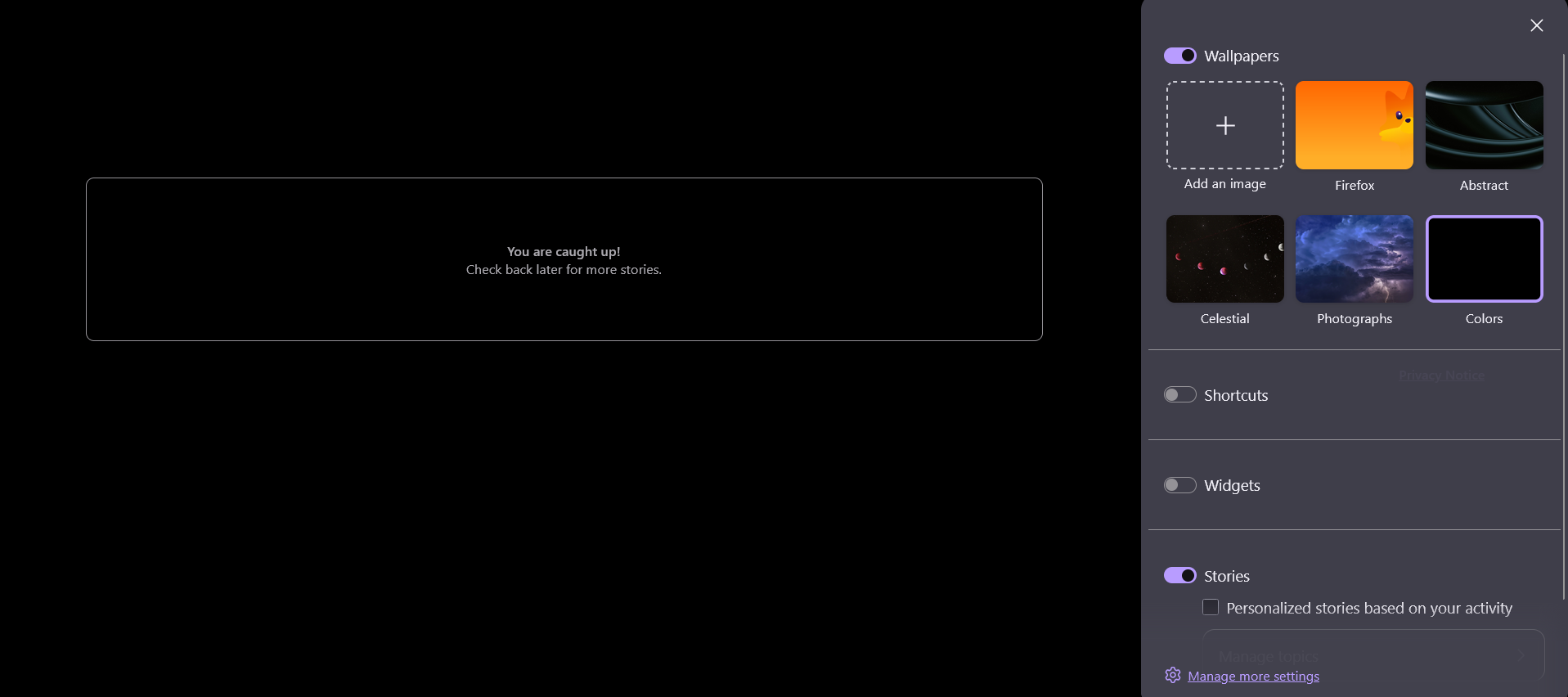
It appears the new update in Firefox has glitched my settings. Everytime I try to disable it on the homepage, and I reload it, it just turns itself back on. Settings not on the homepage does not help either. Nothing appears to work, although it has been working for many years until today.
Vybrané riešenie
Hi,
Sorry you experience this. It's a bug that's being looked into. We believe that regular Settings (Settings > Home and startup > toggles under Firefox Home) should work as expected, though. Could you please confirm if that's the case for you?
Všetky odpovede (4)

Could you clarify
'my settings' what did you have? ' what is/was your home page' as there are numerous options
Settings not on the homepage does not help either. ??
amoun said
Could you clarify 'my settings' what did you have? ' what is/was your home page' as there are numerous options Settings not on the homepage does not help either. ??
There are two ways for settings. The quick settings that can pop up from the lower right on the homepage, which is called customize, and the settings that you have to access through the menu bar and onto another page. The customize one keeps switching from off to on, on the stories option.

Vybrané riešenie
Hi,
Sorry you experience this. It's a bug that's being looked into. We believe that regular Settings (Settings > Home and startup > toggles under Firefox Home) should work as expected, though. Could you please confirm if that's the case for you?
Denys said
Hi, Sorry you experience this. It's a bug that's being looked into. We believe that regular Settings (Settings > Home and startup > toggles under Firefox Home) should work as expected, though. Could you please confirm if that's the case for you?
It works now... It said that the stories were blocked, although they weren't, but I toggled it off and on, and now it is blocking stories now. Thank you for your help!