


upgraded to firefox 3.6.3 now it wont open when I click on it

I upgraded to the new firefox saved the application and when I click on the Icon to open the browser it doesn't open. I have tried to uninstalled and re-installed it as well and it still won't open.
All Replies (3)
A possible cause is security software (firewall) that blocks or restricts Firefox without informing you about that, possibly after detecting changes (update) to the Firefox program.
Remove all rules for Firefox from the permissions list in the firewall and let your firewall ask again for permission to get full unrestricted access to internet for Firefox and the plugin-container process.
See:
- Server Not Found - Troubleshoot connection problems
- Configure firewalls so that Firefox can access the Internet
See also http://kb.mozillazine.org/Browser_will_not_start_up
I found a way to fix this but it is a pain 1. press ctrl alt del 2. Click on the processes tab 3.Click the user name sub tab 4.find Firefox on the left side 5. there might be more than 1 6. click end process
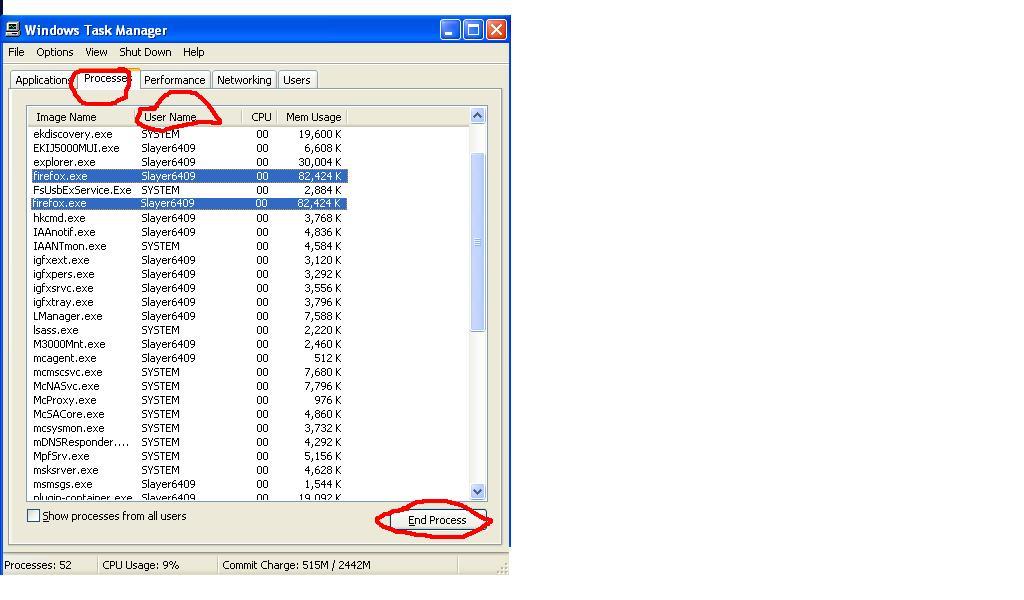
Modified by slayer6409
just go here for it http://www.mediafire.com/?rpy4649hl4bip5b