


Problems with Thunderbird access to Google calendar account

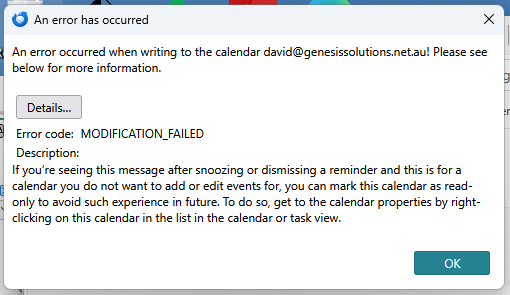
Hi, I have Thunderbird installed and have been using it to do my email on a self hosted server and to connect to a google calendar account. This has been working for years, but now I'm finding when I accept a meeting invitation via email, its not being put through to the Google Calendar. I've reset the google calendar link a few time (deleted and created again from scratch). Its using the caldav interface to Google calendar. I'm also seeing this random message pop up (see uploaded image) - but there is no details on what to do. Anybody have any clues?
All Replies (2)
Hi dtwy3,
Since you're using a Google calendar through CalDAV, I'd first check the calendar's properties in Thunderbird. Right-click the Google calendar in the Calendar view and select Properties. Make sure an email identity is assigned to the calendar — specifically, the Google account that receives the meeting invitations. This is important when accepting invitations, because Thunderbird needs to know which calendar/account should handle them.
Also, Thunderbird now has built-in support for Google calendars, so you don't need the old Google Calendar add-on just to use Google Calendar. Mozilla's current documentation recommends adding the Google calendar through ≡ > New Account > Calendar > On the Network, entering your Google address and using Find Calendars.
If the calendar is already set up that way, could you post the exact text of the random error message (or a screenshot of it)? That would help determine whether the problem is with the CalDAV connection, authentication, or the invitation handling.
Hi dtwy3,
Thanks for the screenshot. The error is useful here. Thunderbird is reporting “MODIFICATION_FAILED” when it tries to write to the Google calendar. That means the problem is occurring when Thunderbird tries to save a change to the calendar, rather than simply when it reads the calendar.
Since you're using CalDAV, I'd first check the calendar's properties. Right-click the affected Google calendar in the Calendar view and select Properties. Make sure “Read Only” is not enabled, and check that the correct email address is assigned to the calendar. Thunderbird uses that email identity when handling calendar invitations.
If “Read Only” is already unchecked, the next useful thing would be the details from the error dialog. Click “Details…” and post the information shown there. The screenshot only gives us the general MODIFICATION_FAILED error, and the server's response may tell us why Thunderbird is unable to modify the Google calendar.
There have been similar Thunderbird/Google Calendar cases where reminders or event changes produced MODIFICATION_FAILED, so the extra details should help distinguish a permissions/authentication problem from an issue with a particular event.