


Windows 11 preview update results in invalid certificate error - timezone change

Hi there.
I'm in Alberta, where we have recently changed timezones. Note that the CLOCK has not changed yet, as we are still before the date in November when we would "fall back". We were UTC-6 summer and UTC-7 winter. Windows called this "Mountain Time (USA and Canada), but now the "Mountain Time (Alberta)" timezone is in Windows after the 2026-09 Preview Update (KB5124010) (26300.9550).
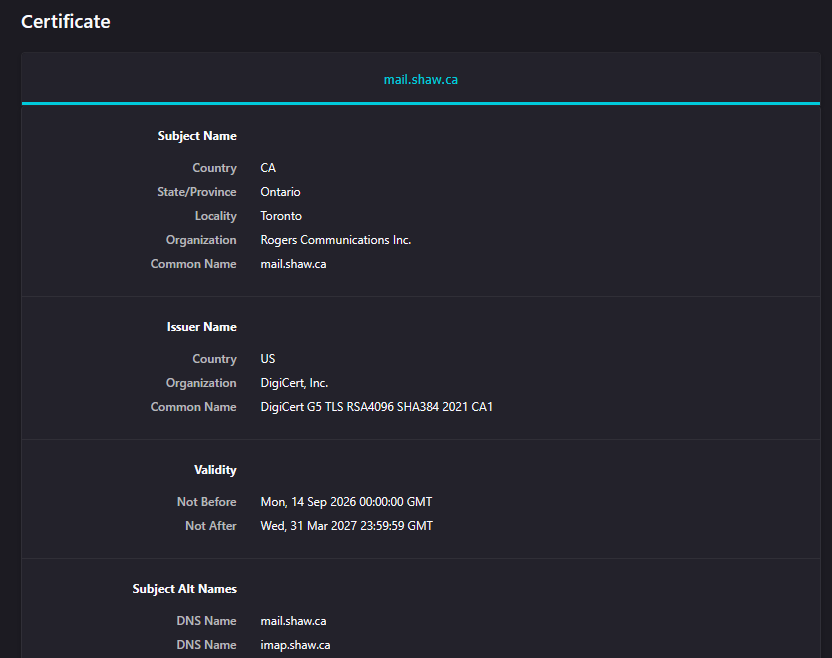
When connecting to Shaw.ca's IMAP servers, the certificates that were valid prior to the Windows update are now reported as invalid. This has been confirmed across two separate PCs with different email accounts. The data for the certificate LOOKS valid (see screenshot) and is the same before and after the timezone change.
The failure occurred on the latest ESR release of Thunderbird, as well as 156.0 and 157.0 non-ESR.
Thanks :)
All Replies (4)
Update: I manually set my timezone back to the old one (the one that will switch back to UTC-7 in November) and I can check my email again, so it seems like it's explicitly tied to the new timezone rather than something else in the Windows update.
Update 2: I spoke too fast; the timezone did not help. This seems to be some sort of issue with the certificate Shaw is issuing for imap.shaw.ca. I had to import an intermediate certificate for DigiCert G5 before the chain would authenticate again.
Modified by evilspoons
Hi evilspoons,
Thanks for the updates. That makes the situation much clearer. If manually importing the DigiCert G5 intermediate certificate restored access, it sounds like the problem is with the certificate chain being presented by Shaw's IMAP server rather than Thunderbird's timezone handling.
DigiCert is also in the process of moving public TLS certificates to its G5 hierarchy, so a change in the certificate chain could explain why this appeared around the same time.
If you still have the certificate warning, it would be useful to check whether Thunderbird reports a missing intermediate certificate in the certificate chain. It may also be worth reporting this to Shaw, since ideally the mail server should provide the necessary intermediate certificate rather than requiring users to install it manually.
I'm being cautious when it comes to saying that it's solved (I will give it a few days), but I must say that attempting to report this to Rogers (who now owns Shaw) was a... less than positive process.
I got stuck with a level one tech who kept insisting they "don't support IMAP" (in spite of having a support page explaining why you would want IMAP with SSL/TLS and how to configure it) and that I "had to call Thunderbird" (in spite of Thunderbird working with IMAP on this server configuration for over twenty years). Sigh.
Hopefully someone competent notices and solves the issue on their end. I am not going to waste any more of my life trying to report the bug to them.
Hi evilspoons,
That makes sense. Your latest test provides a useful clue.
If importing the DigiCert G5 intermediate certificate restores the connection without any other changes, the problem is more likely related to the certificate chain than to the Windows timezone change. Thunderbird needs to verify the chain from the server certificate through the intermediate certificate to a trusted root. If the server does not provide the required intermediate certificate, Thunderbird can report the certificate as invalid.
For now, it may be best to leave the imported certificate in place and see whether the connection continues working over the next few days. If it does, that would support the idea that the problem is with the certificate chain provided by the Shaw/Rogers IMAP server rather than with Thunderbird.
After the experience you had with their support, I can understand why you would not want to spend more time explaining that IMAP is supported. Hopefully the issue reaches someone who can correct the mail server's TLS configuration.