


Any way to customize quick-access / dot menu or relocate Share icon to be more accessible?
Many of the changes in the newest Firefox for mobile are an improvement, but one thing that really isn't is the location of the share button. I use this feature more than any other.
It used to be that I could press and hold to select the tabs I wished to share and the share button would pop right up. Now, the menu contains a bookmark icon (star) and a bin. Meanwhile the share button is hidden under the dot menu, even though there's more than enough room for it in the header bar, even with the star and bin.
If there is currently no way to customize the quick-access icons, I encourage developers to consider making the share button more prevalent or allowing users to customize quick access, in future.
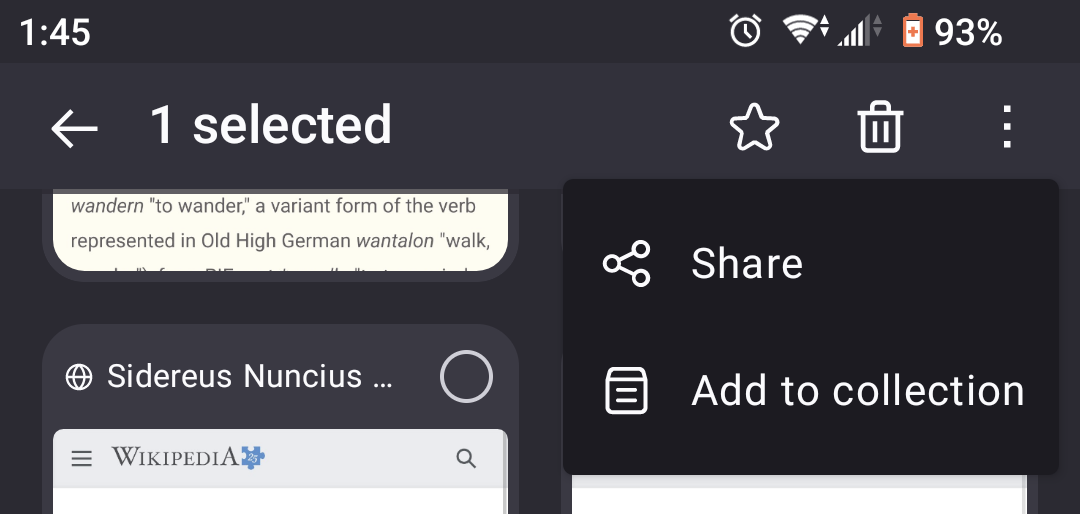
Modified by wynden
All Replies (2)
Hi,
The people who answer questions here, for the most part, are other users volunteering their time (like me), not Mozilla employees or developers. When a Mozilla employee jumps into a discussion, you'll see the Mozilla Staff label next to their name.
If you wish, you can leave feedback for developers on the Mozilla Connect website. Click the Firefox Menu  button in the toolbar, click Help and select Share ideas and feedback…. Alternatively, you can use this link. Your feedback is collected by a team that reads it and gathers data on the most common issues.
You can also file a bug report or feature request. See File a bug report or feature request for Mozilla products for details.