


I can't find the Remote DNS options in the proxy settings (it is usually next to the SOCKS v5 option).

I am running Firefox version 50.0.2. I can't find the Remote DNS options in the proxy settings (it is usally next to the SOCKS v5 option). In the option's place is a blank space
I am running Firefox version 50.0.2. I can't find the Remote DNS options in the proxy settings (it is usally next to the SOCKS v5 option). In the option's place is a blank space

Modified by greg5678
All Replies (1)
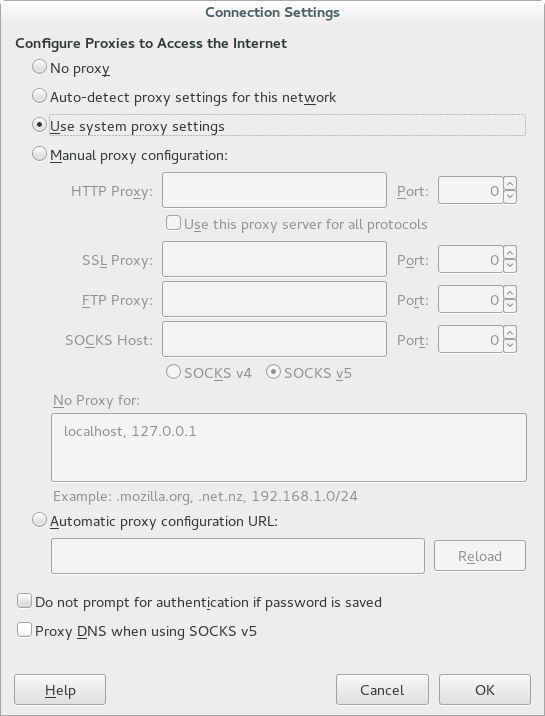
The "Remote DNS" checkbox has been moved to the bottom of the Connection Settings window and is renamed to "Proxy DNS when using SOCKS v5".
- bug 1249494 - Move networkProxySOCKSRemoteDNS checkbox to clarify when it can be set
Please do not comment in bug reports
https://bugzilla.mozilla.org/page.cgi?id=etiquette.html
<checkbox id="networkProxySOCKSRemoteDNS"  preference="network.proxy.socks_remote_dns" label="&socksRemoteDNS.label2;" accesskey="&socksRemoteDNS.accesskey;" />

<!ENTITY  socksRemoteDNS.label2         "Proxy DNS when using SOCKS v5">
Modified by cor-el