


Windows 10 reached EOS (end of support) on October 14, 2025. If you are on Windows 10, see this article.

Search Support

Avoid support scams. We will never ask you to call or text a phone number or share personal information. Please report suspicious activity using the “Report Abuse” option.

Learn More

Cannot find my bookmarks in backed up profiles to transfer to a new PC

  • 1 reply
  • 2 have this problem
  • 127 views
  • Last reply by Paul
  • Archived

I switched to a new computer (Windows 10) from a Windows 7 PC. I had backed up what I thought are designated as Firefox profile folders to be able to restore my bookmarks on the new computer. I reinstalled Firefox on this computer.

When I open the backed up profile I see no "bookmarks" folder nor can I find places.sqlite files.

Is it possible that the bookmarks are contained in another location on my backed up profiles? I attach a picture of their contents.

I really need these bookmarks as they represent several years of work.

I attach a picture of the contents of a backed up profile.
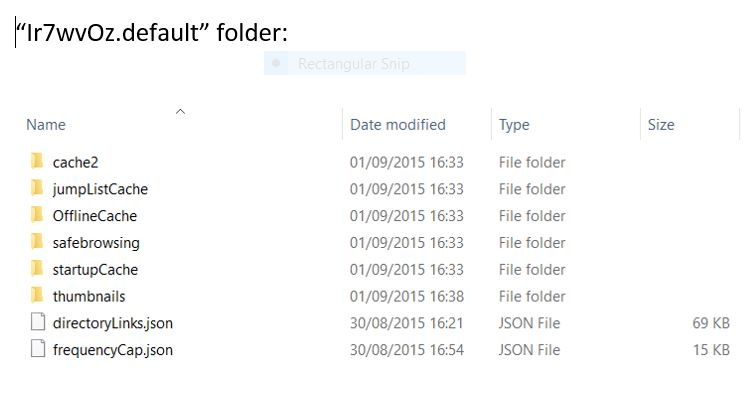
I switched to a new computer (Windows 10) from a Windows 7 PC. I had backed up what I thought are designated as Firefox profile folders to be able to restore my bookmarks on the new computer. I reinstalled Firefox on this computer. When I open the backed up profile I see no "bookmarks" folder nor can I find places.sqlite files. Is it possible that the bookmarks are contained in another location on my backed up profiles? I attach a picture of their contents. I really need these bookmarks as they represent several years of work. I attach a picture of the contents of a backed up profile.
Attached screenshots

All Replies (1)

Hi

Thank you for posting that image, but looking at it I cannot see any evidence of files that would contain your bookmarks.

Assuming that is the only profile you have and that picture represents the full contents, I am unaware of where else they could be.