

This thread was archived.
Please ask a new question if you need help.

Archived
Remove bookmark list from toolbar
I somehow clicked to show all my bookmarks in a toolbar on my Firefox page; I want to remove it but can't find a "how to" anywhere.
Please tell me how.
KC
I somehow clicked to show all my bookmarks in a toolbar on my Firefox page; I want to remove it but can't find a "how to" anywhere.
Please tell me how.
KC
All Replies (4)
Please provide a screenshot.
https://support.mozilla.org/en-US/kb/how-do-i-create-screenshot-my-problem
It is best to use a compressed image type like PNG or JPG to save the screenshot and make sure that you do not exceed a maximum file size of 1 MB.
Then use the Browse .... button below the Post a Reply text box to upload the screenshot.
Please find image attached. The green arrows point to the toolbar I want to remove.
Thanks
Kacee
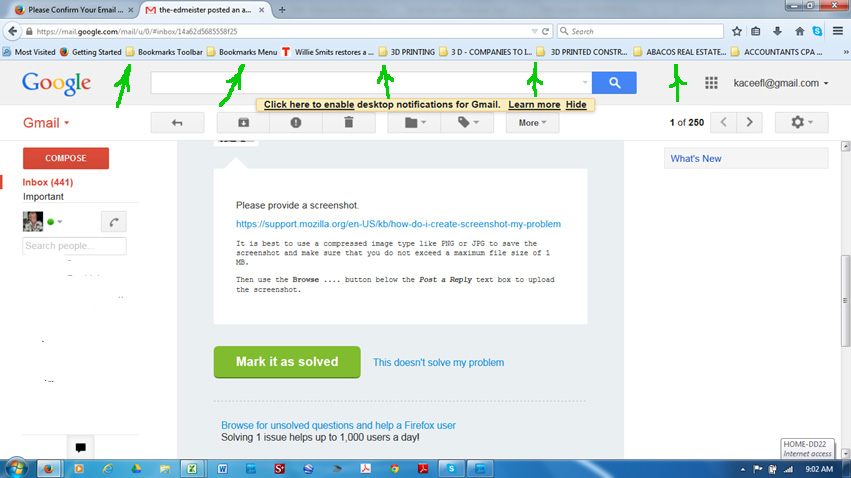
Right-click to the right of the Tab strip and deselect Bookmarks toolbar.
Your suggestion didn't work - there was no way to get to the end of the bookmarks list on that toolbar.
However, I was able in my research to find a solution that only took 2 button pushes:
Helpful Reply
View (Alt-V) - Toolbars Uncheck 'Bookmarks Toolbar'.
Kacee