


Pull down menu on Spirit air website does not work. Ok on IE

Until Firefox 4.0 I was able to use the pull down menu on the spirit airlines website. Now the pull down menu on their site shows nothing. I need to go to Internet Explorer because that works fine, so it not the website. What can I do to correct this problem?
Vince
Все ответы (3)
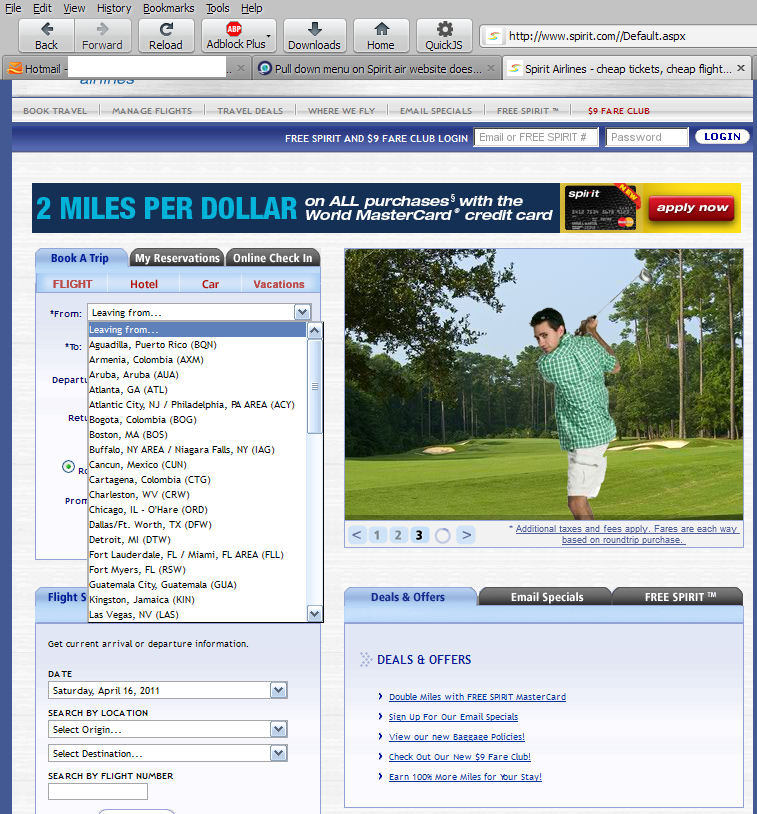
When you say "pull down menu", are you talking about the context menus where you can choose where to depart from etc.?
Those seem to function OK for me. See screenshot.
If that is indeed what you meant, check to see if you're accepting at least session cookies from that site.
You could also try running Firefox in Use Troubleshoot Mode in Firefox. If it functions properly in that configuration, then one of your add-ons is the culprit.
Reload the web page and bypass the cache with:
- Press and hold Shift and left-click the Reload button.
- Press "Ctrl + F5" or press "Ctrl + Shift + R" (Windows,Linux)
- Press "Cmd + Shift + R" (MAC)
Thank you for your assistance, but for some reason, after hitting the refresh button, the destinations appeared in the drop down menu. I will now see if this continues to happen.
mangio 1