


Delete Account button doesn't work. (bug2069949)
After swapping to The Bat some years ago I decided to come back to Thunderbird again. So I installed Thunderbird 155.0.1 (64-bit) on my Windows 11 PC, and gradually re-created and connected the the accounts I had on the back. I also installed the ImportExportTools NG addon, then exported my emails from The Bat to Thunderbird. So far so good. However for some reason I created an account twice. There are both for the same GMX account, but one is POP and the other is iMAP. This mistake probably happened after a long session of setting things up and I just forgot about the first account.
I looked through the Thunderbird help and the answer most given was to the Thunderbird menu, select Account Settings, swap to the account you want to delete, and then press the large red DELETE BUTTON on the top level of its settings (next to the DEFAULT button). I've tried this and it doesn't work. There's no confirmation dialog (which is what I was expecting) and if I close and reboot Thunderbird the account is still there.
How can this be fixed?
Изменено Wayne Mery
Все ответы (9)

Normally, you should see the attached confirmation dialog box.
The first thing to try would be to restart Thunderbird in Troubleshooting Mode (see <Help | Troubleshoot Mode>). Among other things, this will temporarily disable all add-ons, in case one of them is misbehaving.
Does that help?

I reset Mozilla in Troubleshooting mode and it was the same issue. I pressed the DELETE button and there was NO following dialog. I have temporarily unticked Check for new messages at startup and Check for new messages every as a work around.
Are you attempting to delete the default account?
Are you attempting to delete the default account?
NO. Not the default account.
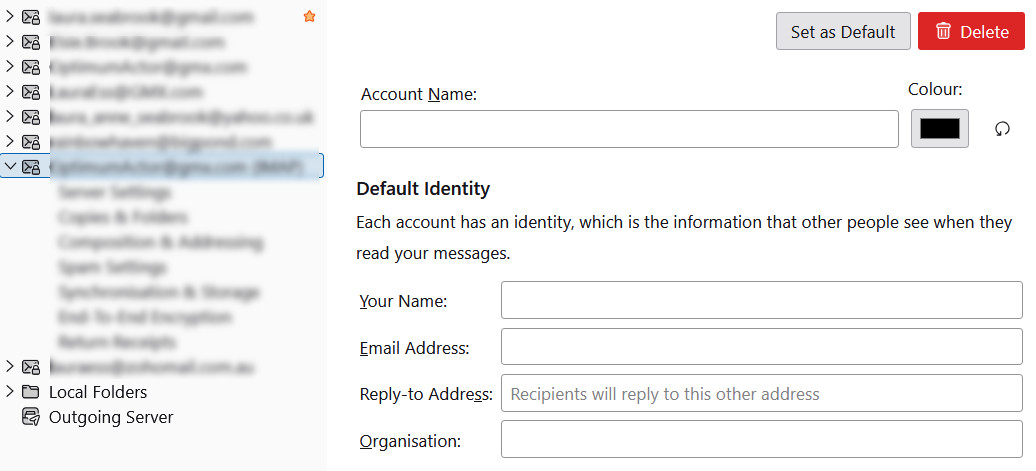
As you can see from the image below (with my account addresses blurred), it's NOT the default, which is marked with a star. I have a few accounts. Some of them are setup for advertising emails, and others are used for Second Life. An odd thing is that the Set as Default button also appears on the default account, where it's a bit redundant. I guess it's a standard form.
Изменено Laura Ess
Check Error Console for warnings or errors just before and after clicking "delete".
Изменено Wayne Mery
??? Error Console? Where do I find that? This is the first time I've used Thunderbird in years. I tried websearching for this and found nothing.
Изменено Laura Ess
Laura Ess said
??? Error Console? Where do I find that? This is the first time I've used Thunderbird in years. I tried websearching for this and found nothing.
Ctrl+shift+J it is also on the menu. But the shortcut is a one hit wonder without any navigation to get right.
Aha -- thank you. I notice though the menu this is on is the Menu Bar and this is initially invisible on install. Anyway I exited & restarted Thunderbird, got the console up and typed // as a marker. Then I pressed the DELETE button of the account I want to delete. These are the results (the ~~~~~~~~~~~~~~~~~~~~~~~ was inserted by me to show where the results started):
13:20:08.706 // 13:20:08.722 undefined ~~~~~~~~~~~~~~~~~~~~~~~ 13:20:12.765 Uncaught NS_ERROR_FAILURE: Component returned failure code: 0x80004005 (NS_ERROR_FAILURE) [nsIObserverService.removeObserver]
<anonymous> chrome://messenger/content/am-main.js:56
am-main.js:56:16 13:20:12.794 NS_ERROR_MALFORMED_URI: Component returned failure code: 0x804b000a (NS_ERROR_MALFORMED_URI) [nsIIOService.newURI] SmtpServer.sys.mjs:237:31 13:20:12.794 Uncaught NS_ERROR_MALFORMED_URI: Component returned failure code: 0x804b000a (NS_ERROR_MALFORMED_URI) [nsIIOService.newURI]
   get serverURI resource:///modules/SmtpServer.sys.mjs:237
   loadSMTPServerList chrome://messenger/content/am-identity-edit.js:533
   onPreInit chrome://messenger/content/am-main.js:121
   restorePage chrome://messenger/content/AccountManager.js:1435
   onPanelLoaded chrome://messenger/content/AccountManager.js:1249
   <anonymous> chrome://messenger/content/am-main.js:16
SmtpServer.sys.mjs:237:31 13:20:14.938 Uncaught TypeError: can't access property "incomingServer", currentAccount is null
   onRemoveAccount chrome://messenger/content/AccountManager.js:920
   oncommand chrome://messenger/content/am-main.xhtml:1
'
Изменено Laura Ess