


Join us to show up for other Firefox users 🦊. Earn fun badges and Mozilla swag vouchers! Find out more: https://mzl.la/askafox150

Windows 10 reached EOS (end of support) on October 14, 2025. If you are on Windows 10, see this article.

Поиск в поддержке

Избегайте мошенников, выдающих себя за службу поддержки. Мы никогда не попросим вас позвонить, отправить текстовое сообщение или поделиться личной информацией. Сообщайте о подозрительной активности, используя функцию «Пожаловаться».

Подробнее

Thunderbird keeps trying to install a new helper tool and never opens.

  • 3 ответа
  • 0 имеют эту проблему
  • Последний ответ от david
  • Открыта

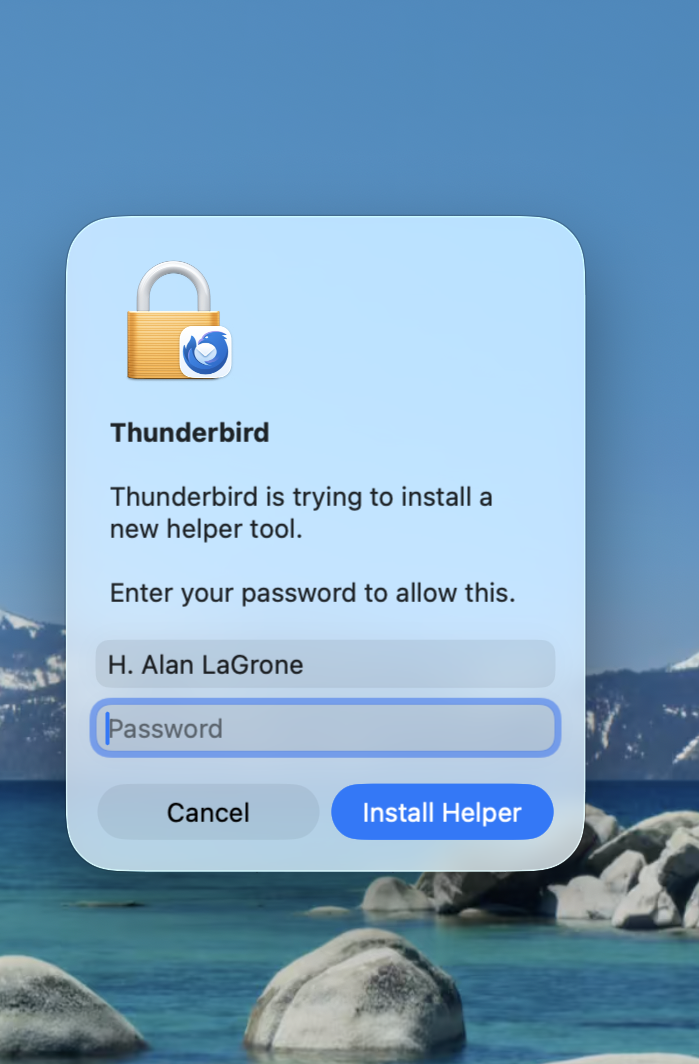
When I try to open Thunderbird it keeps giving me a message that it is trying trouble install a new helper tool and asks for my password. I do so, hit the Install Helper button, and then nothing ever happens. I get a spinning beach ball and it never opens no long how I wait. I would be very grateful for any suggestions or advice on what to do.

When I try to open Thunderbird it keeps giving me a message that it is trying trouble install a new helper tool and asks for my password. I do so, hit the Install Helper button, and then nothing ever happens. I get a spinning beach ball and it never opens no long how I wait. I would be very grateful for any suggestions or advice on what to do.

Все ответы (3)

Thunderbird does not do this. There is something else involved here. Check your anti-virus and see if other apps may be running at the same time. Can you recreate this scenario and post a screenshot? And, I am not one who can fully answer this, but a screenshot would then let a more technically-astute volunteer respond. Thank you

I've attached a screenshot but I don't think it will be very helpful. I have turned off my anti-virus software although nothing has changed. This is soooo frustrating.
Thank you. I will see if I can locate a super tech who can assess this.

Задать вопрос

Для ответа на сообщения вы должны войти в свою учётную запись. Пожалуйста, задайте новый вопрос, если у вас ещё нет учётной записи.