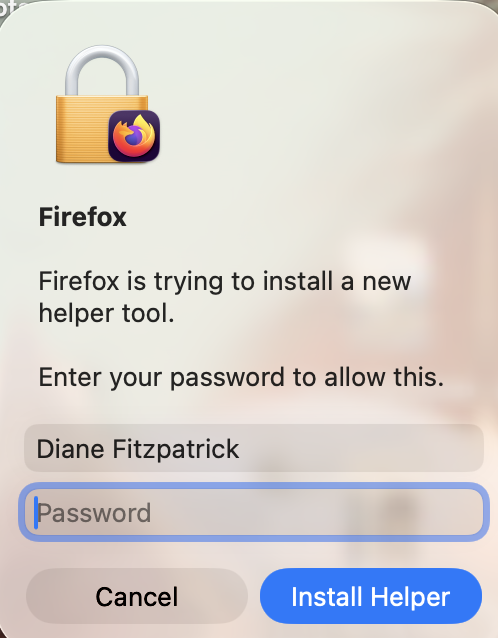
After update wants password to install new helper tool but doesn't accept password

After the last update on my desktop browser, my password was requested in order to "install a new helper tool." But it isn't accepting my password, even after I double checked what it was. And there's no Change Password link.
Since I can still access the Firefox browser on my iPhone, I thought of I'd change my password there and sync, but the new password isn't accepted either. Once a password isn't accepted, pressing cancel closes the app and it can't be reopened without a Force Quit first.
And 'round and 'round I go. How do I regain access to my desktop browser?
Thanks.
After the last update on my desktop browser, my password was requested in order to "install a new helper tool." But it isn't accepting my password, even after I double checked what it was. And there's no Change Password link.
Since I can still access the Firefox browser on my iPhone, I thought of I'd change my password there and sync, but the new password isn't accepted either. Once a password isn't accepted, pressing cancel closes the app and it can't be reopened without a Force Quit first.
And 'round and 'round I go. How do I regain access to my desktop browser?
Thanks.
Все ответы (2)
Can you attach a screenshot of this password request?
- https://support.mozilla.org/en-US/kb/how-do-i-create-screenshot-my-problem
- use a compressed image type like PNG or JPG to save the screenshot