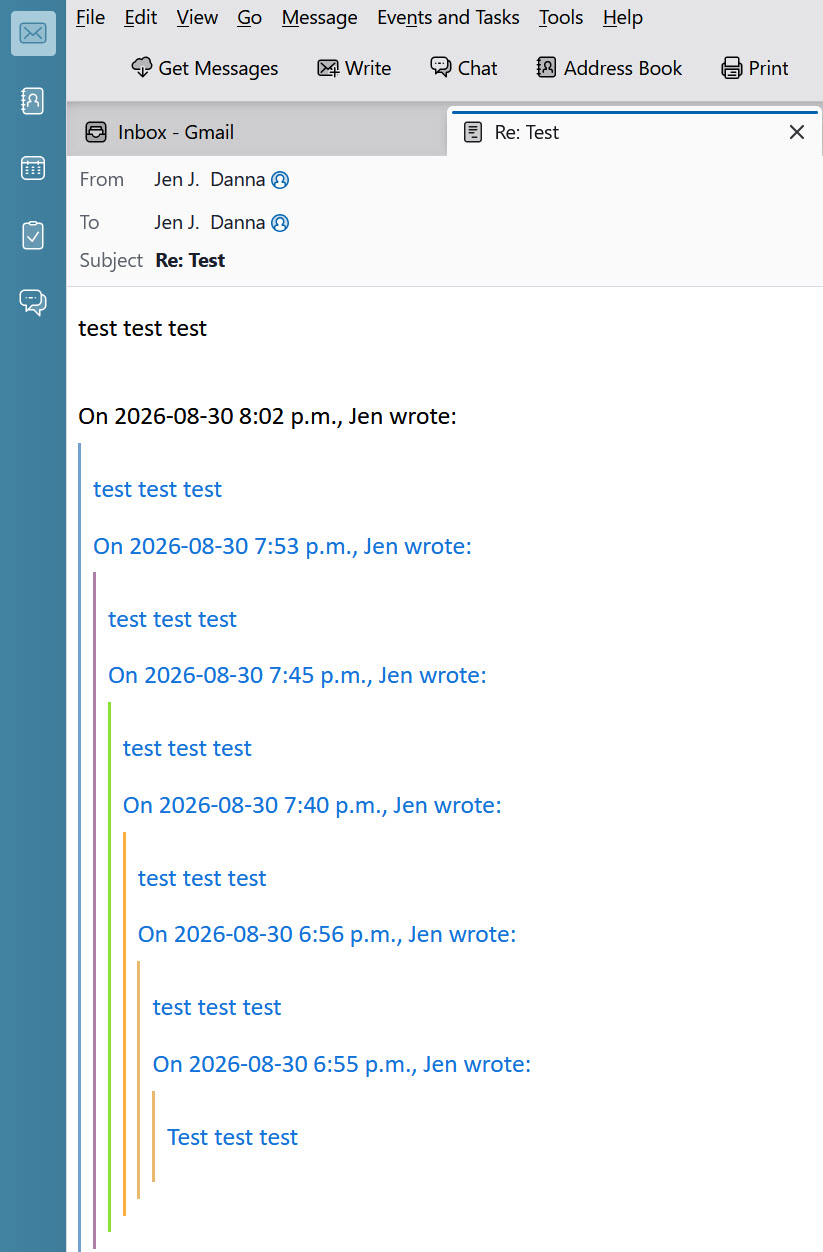
In Thunderbird, how can I stop text in the previous emails in a string turning blue?

In Thunderbird, how can I stop text in the previous emails in a string turning blue?
I have looked everywhere in Settings where colour is mentioned and everything is set to black text on a white background. Nothing is set to blue.
I do not want to see blue text anywhere.
Please advise.
Выбранное решение
I was not aware of the colour menu in Settings (it's new in the 14x versions), but it's definitely the simplest way to set the colour of quoted text. The add-on offers more options, and here is the code for the css method:
blockquote[type=cite]
{
  color: navy !important;
  background-color: RGB(245,245,245) !important;
}

blockquote[type=cite] blockquote
{
  color: maroon !important;
  background-color: RGB(235,235,235) !important;
}

blockquote[type=cite] blockquote blockquote
{
  color: green !important;
  background-color: RGB(225,225,225) !important;
}

blockquote[type=cite] blockquote blockquote blockquote
{
  color: purple !important;
  background-color: RGB(215,215,215) !important;
}

blockquote[type=cite] blockquote blockquote blockquote blockquote
{
  color: teal !important;
  background-color: RGB(205,205,205) !important;
}

/* Quoted text colour for plain text */
span[_moz_quote="true"] {
  color: navy !important;
  background-color: mistyrose !important;
}
pre[_moz_quote="true"] {
  color: navy !important;
  background-color: mistyrose !important;
}
Help/Troubleshooting Info, Profile Folder, Open Folder, close TB, create a new folder named chrome, create a new document in chrome with a text editor, name it userContent.css, Save as type: All files *.*, copy in the above code, change the colours as desired. Double-click toolkit.legacyUserProfileCustomizations.stylesheets to true in Settings/General/Config. editor, restart TB.
Все ответы (15)
Quoted text is only a colour other than black if you have colours set in a userContent.css file or an add-on. See if it's different in Help/Troubleshoot Mode, which disables add-ons and css.
Thank you so much for replying. I have two email addresses and so, in Troubleshoot mode, I sent several test messages between the two, but the messages in the string still turned blue. Then in normal mode again, I disabled my only add-on and removed my only extension, but still no good, so I reinstated them. I don't know how to see if I have any .css files, but if Troubleshoot mode would have disabled them, anyway, I guess I have checked that. I guess I will just have to live with it. Thanks again, anyway.
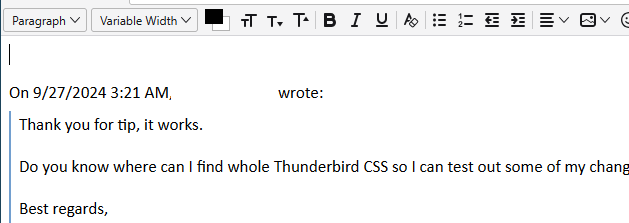
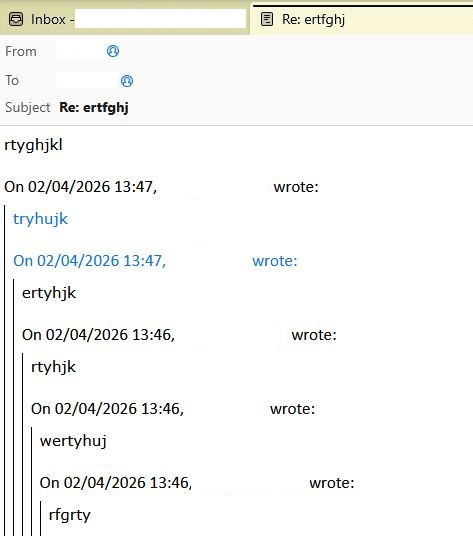
Just to be clear, post a screenshot that shows the blue text in 'the string', The attached picture shows quoted text in black for a reply made in Troubleshoot Mode.
Thanks for your patience with this. I have blacked out my identity. No offence meant.
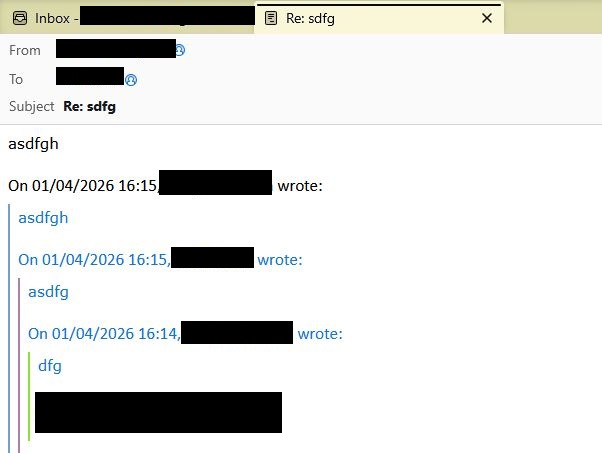
I will show you it in Troubleshoot mode in a minute...
In Troubleshoot mode...
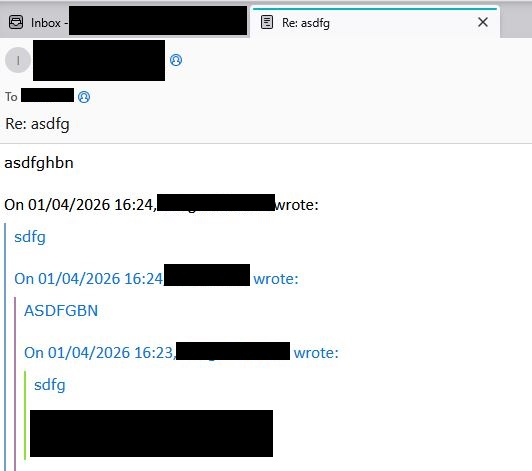
I can confirm that the quoted text colour remains light blue in troubleshoot mode, but not for all messages. It seems to depend on whether the message was composed in plain text or html format. Plus, I can't determine the colour setting in Config. editor for this element.
There is an add-on for setting the quoted text colours, but I find it doesn't work on all html messages. You can test it to see if it's adequate for your purposes.
The method I use applies a userContent.css file to set the colours for multiple quote levels, and seems to work for all messages. Let me know if you want the details. It's a slightly more complex method, but requires only simple file management operations.
Well, I'm extremely grateful for the add-on recommendation. It has 90% solved it, but I still get one message in the string appearing blue.
I attach an example, plus all the options I have set up regarding colour. I can't see what I've missed, but hope that you can.
If you can't see what's wrong, then do send me the details re. the userContent.css file, but I'll need very detailed instructions as I am a real novice at computer coding.
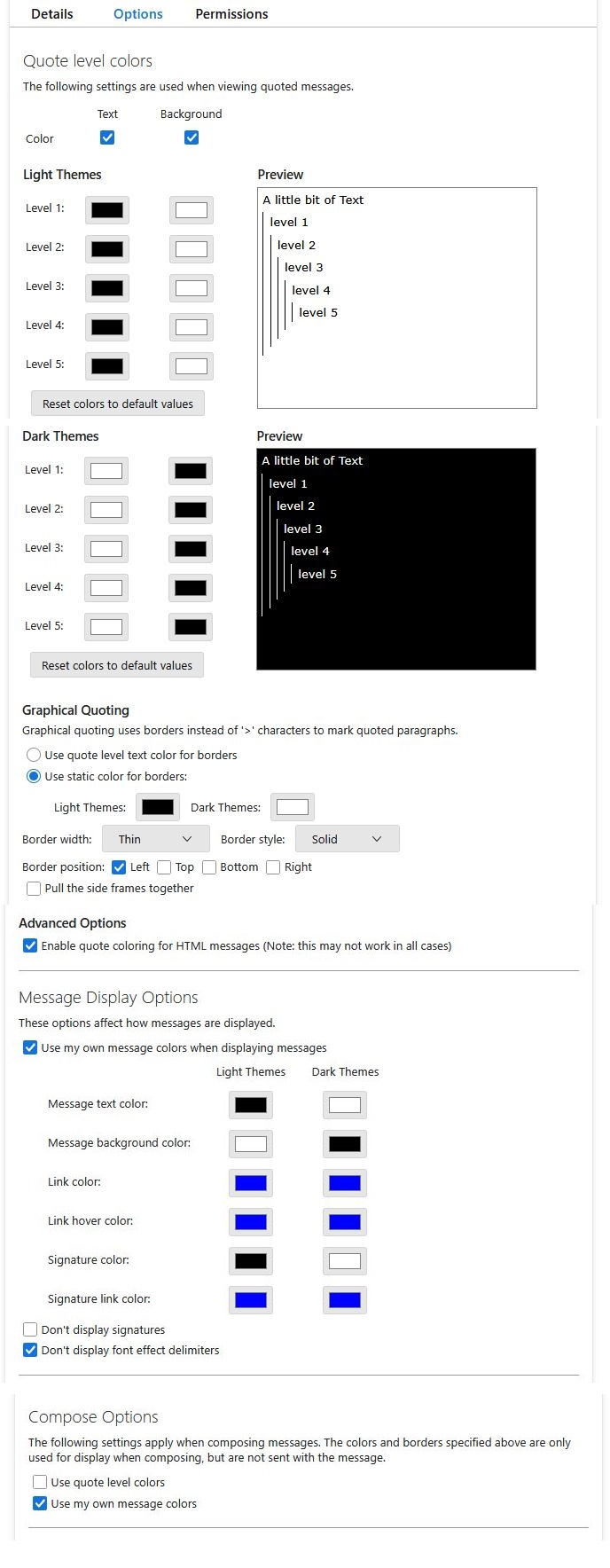
It looks like you have a setting for Plain Text messages to be quoted using Blue Text.
- Settings > General
- Scroll down to the 'Reading & Display' section
- locate: 'Plain Text Messages'
- 'When displaying quoted plain text messages'
- There will be a small Blue rectangle - click on it
- Choose your prefered colour.
- Click on Ok
Выбранное решение
I was not aware of the colour menu in Settings (it's new in the 14x versions), but it's definitely the simplest way to set the colour of quoted text. The add-on offers more options, and here is the code for the css method:
blockquote[type=cite]
{
  color: navy !important;
  background-color: RGB(245,245,245) !important;
}

blockquote[type=cite] blockquote
{
  color: maroon !important;
  background-color: RGB(235,235,235) !important;
}

blockquote[type=cite] blockquote blockquote
{
  color: green !important;
  background-color: RGB(225,225,225) !important;
}

blockquote[type=cite] blockquote blockquote blockquote
{
  color: purple !important;
  background-color: RGB(215,215,215) !important;
}

blockquote[type=cite] blockquote blockquote blockquote blockquote
{
  color: teal !important;
  background-color: RGB(205,205,205) !important;
}

/* Quoted text colour for plain text */
span[_moz_quote="true"] {
  color: navy !important;
  background-color: mistyrose !important;
}
pre[_moz_quote="true"] {
  color: navy !important;
  background-color: mistyrose !important;
}
Help/Troubleshooting Info, Profile Folder, Open Folder, close TB, create a new folder named chrome, create a new document in chrome with a text editor, name it userContent.css, Save as type: All files *.*, copy in the above code, change the colours as desired. Double-click toolkit.legacyUserProfileCustomizations.stylesheets to true in Settings/General/Config. editor, restart TB.
The css method worked. Thank you SO MUCH!
FYI, as I said in my original question: ‘I have looked everywhere in Settings where colour is mentioned and everything is set to black text on a white background. Nothing is set to blue.’ In fact, you can set both General/Plain Text Messages to any colour you like (and Composition/HTML Style to any colour you like), but the string of previous emails will always be blue.
Thank goodness I have now over-ruled this - for good, I hope!
P.S. And General/Plain Text Messages includes quoted plain text messages...

> I was not aware of the colour menu in Settings (it's new in the 14x versions), but it's definitely the simplest way to set the colour of quoted text
But does not work.
Setting General -> Plain text Message colour sets the mail.citation_color variable.
When a text/plain message arrives any line starting with ">" ends up in a: body: blockquote[type = "cite"] block.
And some css somewhere then overrides the mail.citation_color setting with:
color: var(--color-text-highlight)
which is #1373d9 (light theme) or #58c9ff (dark theme).
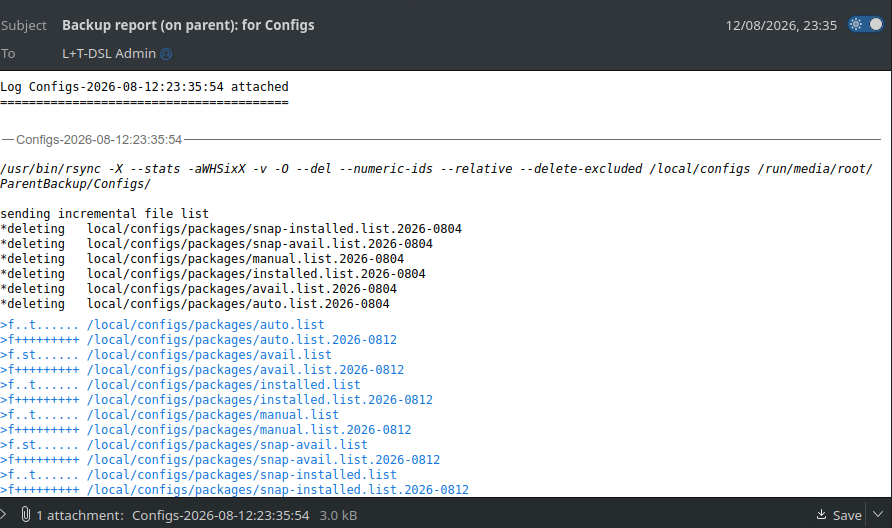
In my case this is not actually a quoted message, but the log file from an "rsync -auWHiv..." backup run.
So I'm going to try that CSS workaround and se whether I can get reasonable looking reports for the first time in many years.
In the meantime, here's a screendump of my problem.
Изменено Gordon Lack
Hurrah!
Once I worked out what a CSS comment actually is (not #, not //, but /* ... */) it worked. Now I just have to set the values to match the rest of the text.

I'm also having this issue and have tried to troubleshoot it using previous posts: 1. Under plain text messages, colour has been changed to black. 2. toolkit.legacyUserProfileCustomizations.stylesheets was already set to true. 3. I already had a userChrome.css file with a single line in it to maintain the menubar (#toolbar-menubar{order:-1 !important;}). To that I added the above multicolour blockquote code, it made no difference. 4. I removed the multicolour code and just went with black that had been suggested in another thread: blockquote[type=cite] { color: black !important; /* background-color: RGB(245,245,245) !important; */
font-weight: normal |important;
} but that made no difference.
Any ideas? This isn't life or death but I'd really prefer it if it was black. This apparently came out of the last update because it was black until then.
Image added of all the times I've sent myself the same message back and forth with layers of blue.
Many thanks for any input! Appreciate the assist!