


Folders not syncing

Hi All, I have been sending emails through Android Thunderbird, but they aren't being synced to the server, so I can't see them anywhere else. I've set the Sent folder to sync (as well as the Inbox). Pressing the sync button just spins the indicator, but doesn't actually sync. When I try to move or copy messages, an error comes up saying that messages can't be copied or moved that aren't synconised. How can all my messages (sent, inbox, everything) be synced so that I can see them everywhere? I've just turned on sync debugging, will see the results soon.

Выбранное решение
Thanks for confirming. Good. TB does know the deleted items folder is "trash" by it's assignment.
I believe your issue is due to the settings you have set below.
- When I delete a message - Do not delete on server
- Erase deleted messages on server - Manually
Can you do a test with the below changes. 1. Setting = Delete from server 2. Setting = Immediately
When you have "Do not delete on server" assigned, deletions are actioned only locally on the phone (moved to the trash folder). The "move to trash / delete" command is not sent to the server.
Can you do a test with the suggested app settings applied.
- Send an email to yourself
- Delete the mail using TB/A
- Check the email shows in the trash folder in TBA
- Login to your email providers web portal and check the same email was successfully moved to the trash folder.
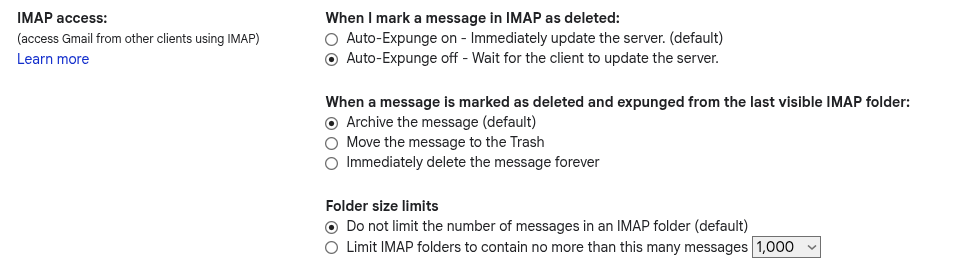
The behaviour that occurs when an IMAP client deletes an email is also controlled in part by the settings applied on your email providers web portal. Can you check what settings are applied there also.
See the screen shot from gmail attached as example
Изменено Platform34
Все ответы (17)
One more question, where can I find the debugging logs?
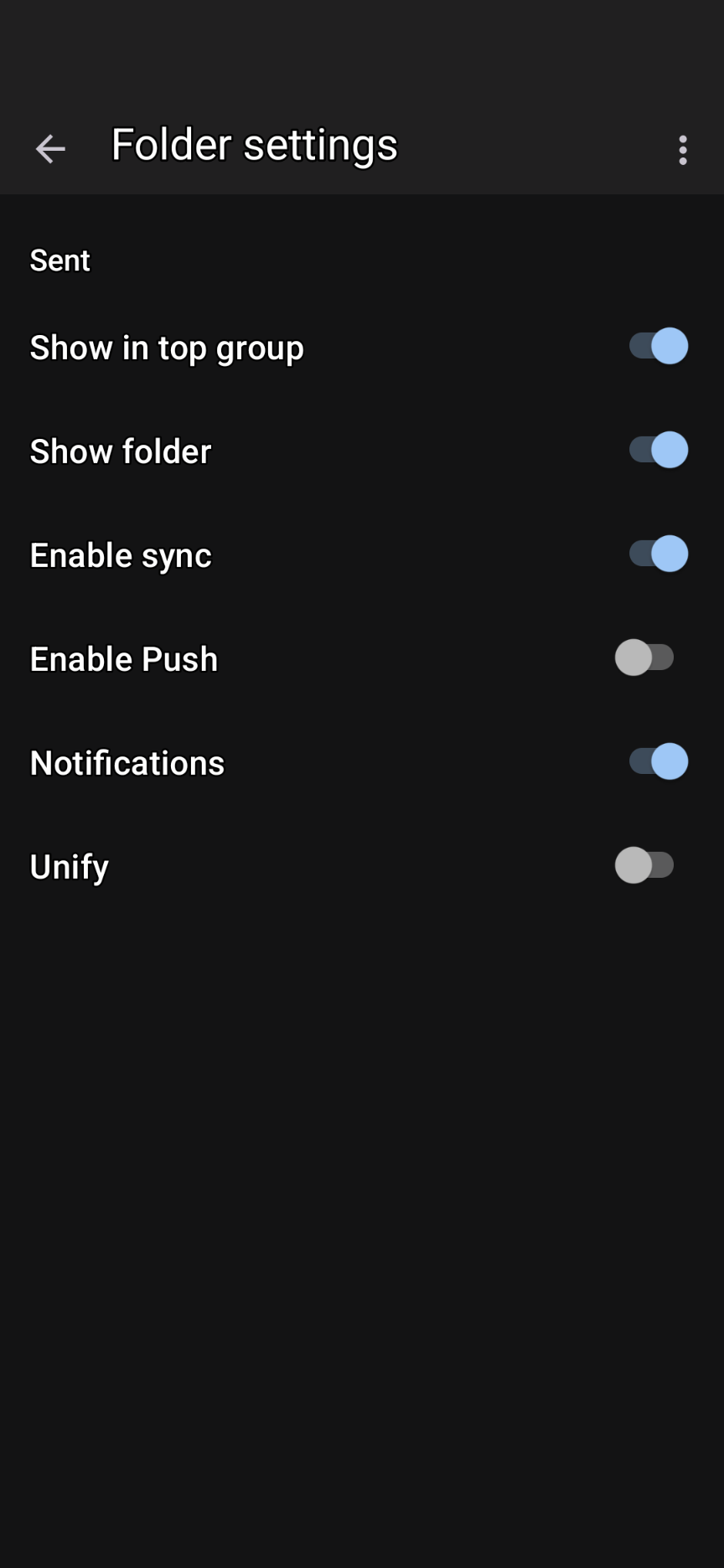
Hi Firefox1748
Please see the link below that guides you on collecting and providing debug logs. The logs are accessed from settings > general settings > debugging.
What version of Thunderbird for Android and email provider you are using? Does your email provider use imap namespace prefixes by any chance?
App Version 12.1 webmail.au.syrahost.com IMAP, yes - Unsure about namespace prefixes(?) . Works ok for Windows Thunderbird...
Not sure how to attach the log file for analysis.
Изменено firefox1748
Not sure if this forum facilitates uploading files other than images.
Can you try the following and advise if sync then works.
Navigate to settings > account > fetching mail > incoming server.
- Untick Auto-detect Imap namespace
- Clear any text in the Imap prefix box
Short of uploading the log file, can you open it in a text editor and search for presence of inbox.inbox Please confirm if it's found.
This will help rule out the below bug v12.1 as a factor. https://github.com/thunderbird/thunderbird-android/issues/9567
Thanks Platform34, I've un-ticked the auto-detect, the text box was empty. Here's a section of the diagnostics log:
10-17 19:10:27.696 10468 10499 I MessagingController: Running command 'syncINBOX.Sent', seq = 94 (background priority) 10-17 19:10:27.700 10468 10499 I ImapSync: Synchronizing folder Personal:INBOX.Sent 10-17 19:10:27.797 10468 10499 E RealImapFolder: Unable to open connection for 9c5794ff-c5ad-409a-82a1-8c2ff1db6c7b:INBOX.Sent/MessagingController/conn62974263 10-17 19:10:27.797 10468 10499 E RealImapFolder: com.fsck.k9.mail.store.imap.NegativeImapResponseException: Command: EXAMINE "INBOX.INBOX.Sent"; response: #45# [NO, Mailbox doesn't exist: INBOX.INBOX.Sent (0.001 + 0.000 secs).] 10-17 19:10:27.797 10468 10499 E RealImapFolder: at com.fsck.k9.mail.store.imap.ImapResponseParser.readStatusResponse(ImapResponseParser.java:127) 10-17 19:10:27.797 10468 10499 E RealImapFolder: at com.fsck.k9.mail.store.imap.RealImapConnection.executeSimpleCommand(RealImapConnection.kt:747) 10-17 19:10:27.797 10468 10499 E RealImapFolder: at com.fsck.k9.mail.store.imap.RealImapConnection.executeSimpleCommand(RealImapConnection.kt:733) 10-17 19:10:27.797 10468 10499 E RealImapFolder: at com.fsck.k9.mail.store.imap.RealImapFolder.executeSimpleCommand(RealImapFolder.kt:106) 10-17 19:10:27.797 10468 10499 E RealImapFolder: at com.fsck.k9.mail.store.imap.RealImapFolder.internalOpen(RealImapFolder.kt:146) 10-17 19:10:27.797 10468 10499 E RealImapFolder: at com.fsck.k9.mail.store.imap.RealImapFolder.open(RealImapFolder.kt:117) 10-17 19:10:27.797 10468 10499 E RealImapFolder: at com.fsck.k9.backend.imap.ImapSync.synchronizeMailboxSynchronous(ImapSync.kt:84) 10-17 19:10:27.797 10468 10499 E RealImapFolder: at com.fsck.k9.backend.imap.ImapSync.sync(ImapSync.kt:34) 10-17 19:10:27.797 10468 10499 E RealImapFolder: at com.fsck.k9.backend.imap.ImapBackend.sync(ImapBackend.kt:56) 10-17 19:10:27.797 10468 10499 E RealImapFolder: at com.fsck.k9.controller.MessagingController.syncFolder(MessagingController.java:658) 10-17 19:10:27.797 10468 10499 E RealImapFolder: at com.fsck.k9.controller.MessagingController.synchronizeMailboxSynchronous(MessagingController.java:596) 10-17 19:10:27.797 10468 10499 E RealImapFolder: at com.fsck.k9.controller.MessagingController.synchronizeFolderInBackground(MessagingController.java:2437) 10-17 19:10:27.797 10468 10499 E RealImapFolder: at com.fsck.k9.controller.MessagingController.$r8$lambda$u9y9ejCYmW7WFdXKvuRwKKaRb94(MessagingController.java:2409) 10-17 19:10:27.797 10468 10499 E RealImapFolder: at com.fsck.k9.controller.MessagingController$$ExternalSyntheticLambda34.run(R8$$SyntheticClass:0) 10-17 19:10:27.797 10468 10499 E RealImapFolder: at com.fsck.k9.controller.MessagingController.runInBackground(MessagingController.java:239) 10-17 19:10:27.797 10468 10499 E RealImapFolder: at com.fsck.k9.controller.MessagingController.-$$Nest$mrunInBackground(MessagingController.java:0) 10-17 19:10:27.797 10468 10499 E RealImapFolder: at com.fsck.k9.controller.MessagingController$1.run(MessagingController.java:179) 10-17 19:10:27.797 10468 10499 E RealImapFolder: at java.lang.Thread.run(Thread.java:1119) 10-17 19:10:27.798 10468 10499 E ImapSync: synchronizeMailbox 10-17 19:10:27.798 10468 10499 E ImapSync: com.fsck.k9.mail.store.imap.NegativeImapResponseException: Command: EXAMINE "INBOX.INBOX.Sent"; response: #45# [NO, Mailbox doesn't exist: INBOX.INBOX.Sent (0.001 + 0.000 secs).] 10-17 19:10:27.798 10468 10499 E ImapSync: at com.fsck.k9.mail.store.imap.ImapResponseParser.readStatusResponse(ImapResponseParser.java:127) 10-17 19:10:27.798 10468 10499 E ImapSync: at com.fsck.k9.mail.store.imap.RealImapConnection.executeSimpleCommand(RealImapConnection.kt:747) 10-17 19:10:27.798 10468 10499 E ImapSync: at com.fsck.k9.mail.store.imap.RealImapConnection.executeSimpleCommand(RealImapConnection.kt:733) 10-17 19:10:27.798 10468 10499 E ImapSync: at com.fsck.k9.mail.store.imap.RealImapFolder.executeSimpleCommand(RealImapFolder.kt:106) 10-17 19:10:27.798 10468 10499 E ImapSync: at com.fsck.k9.mail.store.imap.RealImapFolder.internalOpen(RealImapFolder.kt:146) 10-17 19:10:27.798 10468 10499 E ImapSync: at com.fsck.k9.mail.store.imap.RealImapFolder.open(RealImapFolder.kt:117) 10-17 19:10:27.798 10468 10499 E ImapSync: at com.fsck.k9.backend.imap.ImapSync.synchronizeMailboxSynchronous(ImapSync.kt:84) 10-17 19:10:27.798 10468 10499 E ImapSync: at com.fsck.k9.backend.imap.ImapSync.sync(ImapSync.kt:34) 10-17 19:10:27.798 10468 10499 E ImapSync: at com.fsck.k9.backend.imap.ImapBackend.sync(ImapBackend.kt:56) 10-17 19:10:27.798 10468 10499 E ImapSync: at com.fsck.k9.controller.MessagingController.syncFolder(MessagingController.java:658) 10-17 19:10:27.798 10468 10499 E ImapSync: at com.fsck.k9.controller.MessagingController.synchronizeMailboxSynchronous(MessagingController.java:596) 10-17 19:10:27.798 10468 10499 E ImapSync: at com.fsck.k9.controller.MessagingController.synchronizeFolderInBackground(MessagingController.java:2437) 10-17 19:10:27.798 10468 10499 E ImapSync: at com.fsck.k9.controller.MessagingController.$r8$lambda$u9y9ejCYmW7WFdXKvuRwKKaRb94(MessagingController.java:2409) 10-17 19:10:27.798 10468 10499 E ImapSync: at com.fsck.k9.controller.MessagingController$$ExternalSyntheticLambda34.run(R8$$SyntheticClass:0) 10-17 19:10:27.798 10468 10499 E ImapSync: at com.fsck.k9.controller.MessagingController.runInBackground(MessagingController.java:239) 10-17 19:10:27.798 10468 10499 E ImapSync: at com.fsck.k9.controller.MessagingController.-$$Nest$mrunInBackground(MessagingController.java:0) 10-17 19:10:27.798 10468 10499 E ImapSync: at com.fsck.k9.controller.MessagingController$1.run(MessagingController.java:179) 10-17 19:10:27.798 10468 10499 E ImapSync: at java.lang.Thread.run(Thread.java:1119) 10-17 19:10:27.804 10468 10499 E ImapSync: Failed synchronizing folder Personal:INBOX.Sent @ Fri Oct 17 19:10:27 AEDT 2025 10-17 19:10:27.807 10468 10499 I MessagingController: Command 'syncINBOX.Sent' completed
It does seem to be the same issue. Any fix yet? Should I re-tick the auto detect??
Hi Firefox1748
Thanks for supplying the log extract. It confirms you're experiencing the bug I referenced.
Command: EXAMINE "INBOX.INBOX.Sent"; response: #45# [NO, Mailbox doesn't exist: INBOX.INBOX.Sent
I'd recommend leaving "auto-detect imap namespace" unticked until you upgrade the app. Please also check the special folders such as Draft, Sent, trash etc are still mapped correctly under ..
- Settings > Account > Folders.
K-9 version 13 was released yesterday on github .
It fixes the issue. You'll need to obtain the update from the same source as your existing install to upgrade it. It's be a few days before it's available on the F-Droid store.
Thanks for the info, Platform34. I've updated Android Thunderbird, but the Sent folder still wont sync to the server. I still get a message that I can't move or copy messages that are not synchronized. This is a major issue as I don't want to email anything from my phone and have to wait till I get back to the computer.
According to the log: 10-24 09:52:25.600 30122 30146 I MessagingController: Running command 'syncINBOX.Sent', seq = 67 (background priority) 10-24 09:52:25.603 30122 30146 D MessagingController: Last folder list refresh @ Fri Oct 24 09:49:35 AEDT 2025. Not refreshing now. 10-24 09:52:25.604 30122 30146 I ImapSync: Synchronizing folder Personal:INBOX.Sent 10-24 09:52:25.713 30122 30146 D RealImapFolder: Got untagged EXISTS with value 705 for 9c5794ff-c5ad-409a-82a1-8c2ff1db6c7b:INBOX.Sent/MessagingController/conn238026856 10-24 09:52:25.713 30122 30146 D RealImapFolder: Got UidNext = 3549 for 9c5794ff-c5ad-409a-82a1-8c2ff1db6c7b:INBOX.Sent/MessagingController/conn238026856 10-24 09:52:25.892 30122 30146 D ImapSync: SYNC: Have 0 unsynced messages 10-24 09:52:25.892 30122 30146 D ImapSync: SYNC: Have 0 large messages and 0 small messages out of 0 unsynced messages 10-24 09:52:25.892 30122 30146 D ImapSync: SYNC: Fetching 0 small messages for folder INBOX.Sent 10-24 09:52:25.892 30122 30146 D ImapSync: SYNC: Done fetching small messages for folder INBOX.Sent 10-24 09:52:25.892 30122 30146 D ImapSync: SYNC: Fetching large messages for folder INBOX.Sent 10-24 09:52:25.892 30122 30146 D ImapSync: SYNC: Done fetching large messages for folder INBOX.Sent 10-24 09:52:25.892 30122 30146 D ImapSync: SYNC: About to sync flags for 705 remote messages for folder INBOX.Sent 10-24 09:52:26.485 30122 30146 D ImapSync: SYNC: Synced remote messages for folder INBOX.Sent, 0 new messages 10-24 09:52:26.490 30122 30146 D ImapSync: Done synchronizing folder Personal:INBOX.Sent @ Fri Oct 24 09:52:26 AEDT 2025 10-24 09:52:26.490 30122 30146 I ImapSync: Done synchronizing folder Personal:INBOX.Sent 10-24 09:52:26.491 30122 30146 I MessagingController: Command 'syncINBOX.Sent' completed
There are no un-sync'd messages, but there are. One part of AT'bird knows they're un-sync'd, but another part doesn't. How do I force it to sync all messages?
Hi Firefox1748
Can you check your sent folder is correctly assigned, ie it's not set to none. Go to: Settings > Account > Folders
The Thunderbird team and wider community might have further suggestions.
Assuming you're now using v13, your quickest resolution might be to remove and add the account again. You can export your account settings to a file and use this to restore the account after removal. Go to: Settings > Export / Import.
Your emails will download again once you complete the account login.
To remove an account Go to settings > account > three dot menu > remove.
Thanks for all your help, Platform34, but downloading isn't a problem - it's uploading messages I've sent to the server.
Изменено firefox1748
firefox1748
Do you still have this problem?
Kinda, Wayne.
I can send emails from my phone and find them on the laptop, but if I delete an email on the phone, it won't be deleted on the laptop. Marking an email as spam on the phone does put it in the junk folder on the laptop, though.
Have you looked at the two settings below in the mobile app which affect deletion behavior. Settings > account > fetching mail ...
1. When I delete a message
  Do not delete on server
  Delete from server
  Mark as read on server
2. Erase deleted messages on server
   Immediately
   when polling
   Manually
Platform34, I checked and:
1. When I delete a message - Do not delete on server 2. Erase deleted messages on server - Manually
I have changed (2) to "When polling", but I expected that deleted emails are put into the Deleted folder, not just removed from the inbox.
Have you checked all the special folders are assigned correctly under Settings > account > folders.
I don't see a confirmation from you when I previously asked.
If you don't have a "deleted items folder" assigned here, emails will be removed as you observe, instead of being placed in the deleted items folder.
I have the "Trash" folder selected, Platform34. Would TB/A know that it's the "Delete" folder?
Выбранное решение
Thanks for confirming. Good. TB does know the deleted items folder is "trash" by it's assignment.
I believe your issue is due to the settings you have set below.
- When I delete a message - Do not delete on server
- Erase deleted messages on server - Manually
Can you do a test with the below changes. 1. Setting = Delete from server 2. Setting = Immediately
When you have "Do not delete on server" assigned, deletions are actioned only locally on the phone (moved to the trash folder). The "move to trash / delete" command is not sent to the server.
Can you do a test with the suggested app settings applied.
- Send an email to yourself
- Delete the mail using TB/A
- Check the email shows in the trash folder in TBA
- Login to your email providers web portal and check the same email was successfully moved to the trash folder.
The behaviour that occurs when an IMAP client deletes an email is also controlled in part by the settings applied on your email providers web portal. Can you check what settings are applied there also.
See the screen shot from gmail attached as example
Изменено Platform34
That worked Platform34, thanks. Such a simple mistake - I'm embarrassed.