


After update - inbox listing shown in a way that Ican not read it anymore

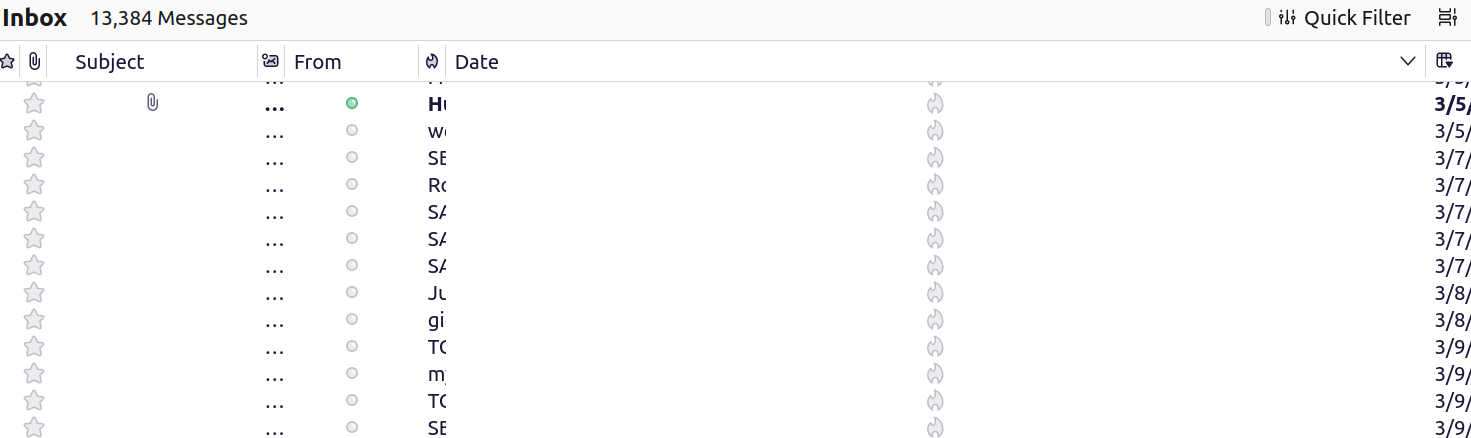
Hello, Many thanks for providing thunderbird. After the last update to 115.180.0 (Linux Mint 20) my inbox is shown in a way, that I can not read it anymore. I really do not how to describe it properly. So I attached a screenshot on the part I find difficult to read. I think there is a off by one between the column header an the content. Downgrading to a previous version was not possible - the profile was changed. Can I fix this myself - if yes how. Looking forward to your reply.
Выбранное решение
Finally I did find the time to look into this. Updating to 128 on linux Mint 21 was posted to have issues worse than those described above. So I did changed the items to display and could read more. dragging the columns in a different order gave me display I could use for reading and organizing my mails.
Прочитайте этот ответ в контексте 👍 0Все ответы (4)
The 128 ESR series fixes issues that will never be fixed in 115. It would be best for you to update. https://support.mozilla.org/en-US/kb/installing-thunderbird-linux
Thanks for the prompt reply. I you write update do you mean to completely remove and re-install? Is the a apt way?
Выбранное решение
Finally I did find the time to look into this. Updating to 128 on linux Mint 21 was posted to have issues worse than those described above. So I did changed the items to display and could read more. dragging the columns in a different order gave me display I could use for reading and organizing my mails.
Claus, thanks for the update AND marking the solution.
If people are reporting issues about version 128 and Mint 21, can you point me to them?