


Windows 10 reached EOS (end of support) on October 14, 2025. For more information, see this article.

Поиск в поддержке

Избегайте мошенников, выдающих себя за службу поддержки. Мы никогда не попросим вас позвонить, отправить текстовое сообщение или поделиться личной информацией. Сообщайте о подозрительной активности, используя функцию «Пожаловаться».

Подробнее

Can't play netflix. Error code F7701-1003

  • 7 ответов
  • 3 имеют эту проблему
  • 230 просмотров
  • Последний ответ от Nikolay Minev

дополнительные действия

I'm getting the F7701-1003 error every time I try to play Netflix (works fine on other browsers). I tried every step of this guide this guide and triple checked it. I tried uninstalling, resetting profile, I that checked resistfingerprinting is turned on. I'm kind of at a lost. At this point I'm being forced to use other browsers...

I'm getting the F7701-1003 error every time I try to play Netflix (works fine on other browsers). I tried every step of [https://help.netflix.com/en/node/32661 this guide] this guide and triple checked it. I tried uninstalling, resetting profile, I that checked resistfingerprinting is turned on. I'm kind of at a lost. At this point I'm being forced to use other browsers...
Приложенные скриншоты

Выбранное решение

I figured it out. I was lacking Media Feature Pack on my Windows. For whatever reason it was screwing with Firefox and once installed it fixed it.

Прочитайте этот ответ в контексте 👍 2

Все ответы (7)

дополнительные действия

Nikolay Minev said

I that checked resistfingerprinting is turned on.

It should be off (false). It may block Netflix.

дополнительные действия

TyDraniu said

Nikolay Minev said

I that checked resistfingerprinting is turned on.

It should be off (false). It may block Netflix.

it's false, sorry misspoke

дополнительные действия

Do you have any extensions?

дополнительные действия

TyDraniu said

Do you have any extensions?

Dark reader and ublocker. Tried removing them, didn't help

дополнительные действия

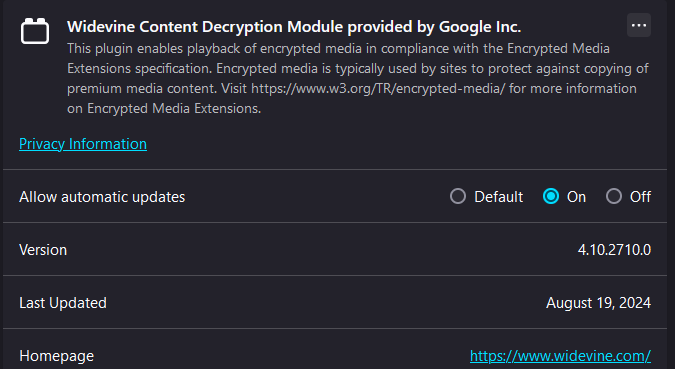
Also go to about:addons -> Plugins and check if you have Widevine CDM 4.10.2710.0

дополнительные действия

TyDraniu said

Also go to about:addons -> Plugins and check if you have Widevine CDM 4.10.2710.0

Checked, it's 4.10
дополнительные действия

Выбранное решение

I figured it out. I was lacking Media Feature Pack on my Windows. For whatever reason it was screwing with Firefox and once installed it fixed it.

Изменено Nikolay Minev