


Bookmark this page font too small

How do I fix this? There seems to be no answer. The about:config , about:preferences do nothing. I am tired of this.

Все ответы (7)
Do you have any custom Windows themes installed that might have made registry modifications?
checked theme setup. Not sure if it is the culprit. I have attached another screenshot. This itty bitty font shows up in the window frame of other applications also. This is a win 11 OEM install on a new MSI Titan laptop. Thank you.
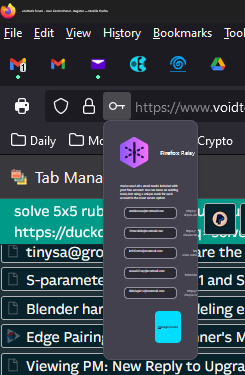
Изменено Phyzxengr Moore
I think Firefox on Windows uses the Segoe UI font throughout the toolbar area. Your tab text looks unaffected, so I don't know why only some text is weirdly small. Does your Windows theme use a font other than Segoe UI? Maybe Firefox tries to follow that sometimes and not others??
Start Firefox in Troubleshoot Mode to check if one of the extensions ("3-bar" menu button or Tools -> Add-ons -> Extensions) or if hardware acceleration or if userChrome.css/userContent.css is causing the problem.
- switch to the Default System theme: "3-bar" menu button or Tools -> Add-ons -> Themes
- do NOT click the "Refresh Firefox" button on the Troubleshoot Mode start window
This did not fix.
Can some one do a remote in?
And the problem comes and goes. MS API seriously messed up.