

Эта тема была архивирована.
Если вам нужна помощь, задайте новый вопрос.

Решён
Архивировано
Click Address Bar not showing top sites

Previously I was able to click my address bar and it would show a drop down with various sites that I frequently visited. I think it updated and I can no longer do this, is it possible to revert back to this option?
Previously I was able to click my address bar and it would show a drop down with various sites that I frequently visited. I think it updated and I can no longer do this, is it possible to revert back to this option?
Все ответы (2)
Выбранное решение
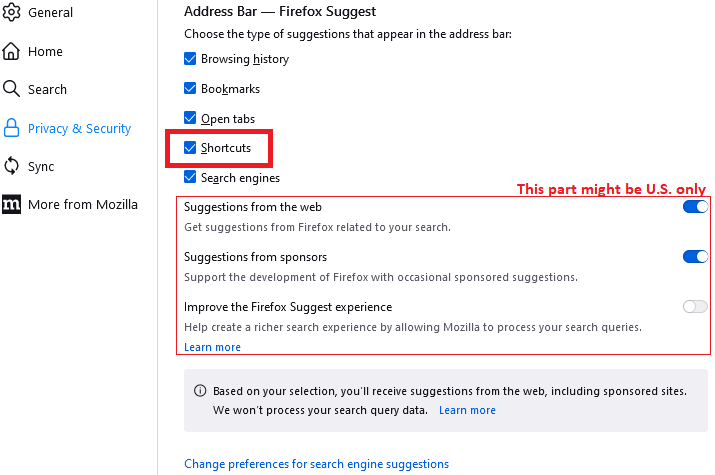
Hi, this feature is now called "Shortcuts" on the Settings page, Privacy & Security panel, Address Bar section:

That triggers Firefox to show your Shortcuts (previously called Top Sites) from the built-in Firefox Home / new tab page.
More info:
By the way, if you want a pure frequent History list, you can click the "clock" icon along the bottom of the drop-down.