


Firefox asks to open firefox.exe everytime I launch it

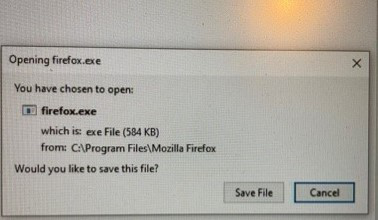
Hi, I am running 64-bit firefox 90.0.2 on windows 10. Every time i launch it, it opens a dialog box on the right side that says Opening firefox.exe You have chosen to open: firefox.exe Would you like to save this file? Save File or Cancel are the only 2 options
How do I get rid of this dialog box and open firefox normally?
Thank you!!
Hi,
I am running 64-bit firefox 90.0.2 on windows 10. Every time i launch it, it opens a dialog box on the right side that says
Opening firefox.exe
You have chosen to open: firefox.exe
Would you like to save this file?
Save File or Cancel are the only 2 options
How do I get rid of this dialog box and open firefox normally?
Thank you!!
Выбранное решение
You may have accidentally set a download page/link as your homepage.
You can check the homepage setting.
- Settings -> Home
- https://support.mozilla.org/en-US/kb/how-to-set-the-home-page
Firefox supports multiple homepages separated by '|' (pipe) symbols.
Прочитайте этот ответ в контексте 👍 0Все ответы (1)
Выбранное решение
You may have accidentally set a download page/link as your homepage.
You can check the homepage setting.
- Settings -> Home
- https://support.mozilla.org/en-US/kb/how-to-set-the-home-page
Firefox supports multiple homepages separated by '|' (pipe) symbols.