


firefox ver. 69 is blocking my unsecured site, testsite.judithjudy.com/wordpress/wp-login.php and the unblock documentation does not work

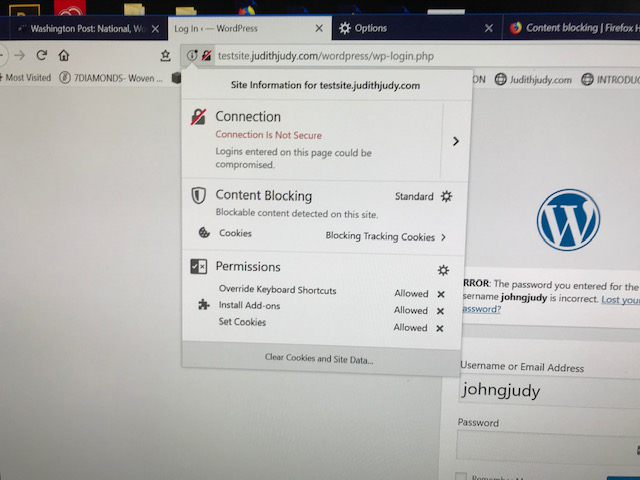
3 days ago firefox version 69 started blocking testsite.judithjudy.com/wordpress/wp-login.php. It takes me to my login page but locks me out. When I click on the red slash the attached page shows. Note that the "Turn off Blocking for this Site" is not there. I followed every suggestion in the documentation to no avail. Your help will be greatly appreciated. John Judy
Все ответы (3)
There is no shield icon present on the location bar, so Content Blocking isn't actively blocking content.
If you use extensions ("3-bar" menu button or Tools -> Add-ons -> Extensions) that can block content (Adblock Plus, NoScript, Disconnect, Ghostery, Privacy Badger, uBlock Origin) always make sure such extensions do not block content.
- make sure your extensions and filters are updated to the latest version
- https://support.mozilla.org/en-US/kb/troubleshoot-extensions-themes-to-fix-problems
You can try these steps in case of issues with web pages:
You can reload web page(s) and bypass the cache to refresh possibly outdated or corrupted files.
- hold down the Shift key and left-click the Reload button
- press "Ctrl + F5" or press "Ctrl + Shift + R" (Windows,Linux)
- press "Command + Shift + R" (Mac)
Clear the Cache and remove the Cookies from websites that cause problems via the "3-bar" Firefox menu button (Options/Preferences).
"Remove the Cookies" from websites that cause problems:
- Options/Preferences -> Privacy & Security
Cookies and Site Data -> Manage Data
"Clear the Cache":
- Options/Preferences -> Privacy & Security
Cookies and Site Data -> Clear Data -> Cached Web Content: Clear
Start Firefox in Safe Mode to check if one of the extensions ("3-bar" menu button or Tools -> Add-ons -> Extensions) or if hardware acceleration is causing the problem.
- switch to the DEFAULT theme: "3-bar" menu button or Tools -> Add-ons -> Themes
- do NOT click the "Refresh Firefox" button on the Safe Mode start window
Выбранное решение
johngjudy07 said
It takes me to my login page but locks me out.
What do you mean by that? The page seems to be showing a wrong password error. That's not something Firefox's Content Blocking feature could cause.
Thank you. It turned out to be a password issue that I have now fixed.