


Questions mark show up in e-mails I send. Suggestions to fix problem require me to click on "Config.editor", but that button doesn't appear on my windows 10.

I go through Tools/options/advanced, but that only brings up choices about fonts. The necessary "Config.editor" never appears. I'm stymied.
Все ответы (4)
re :Questions mark show up in e-mails I send. Suggestions to fix problem require me to click on "Config.editor",
I'm not sure what 'suggestions' you are talking about which suggest anything to do with 'config editor'. You are looking for Text Encodings.
re :I go through Tools/options/advanced, but that only brings up choices about fonts.
It seems you really are not sure what you are selecting and appear confused or your typing of where you are looking is incorrect.
Tools/Options/Advanced/'General' tab will show the 'config editor' button. But, it is unlikely you need to use those instructions.
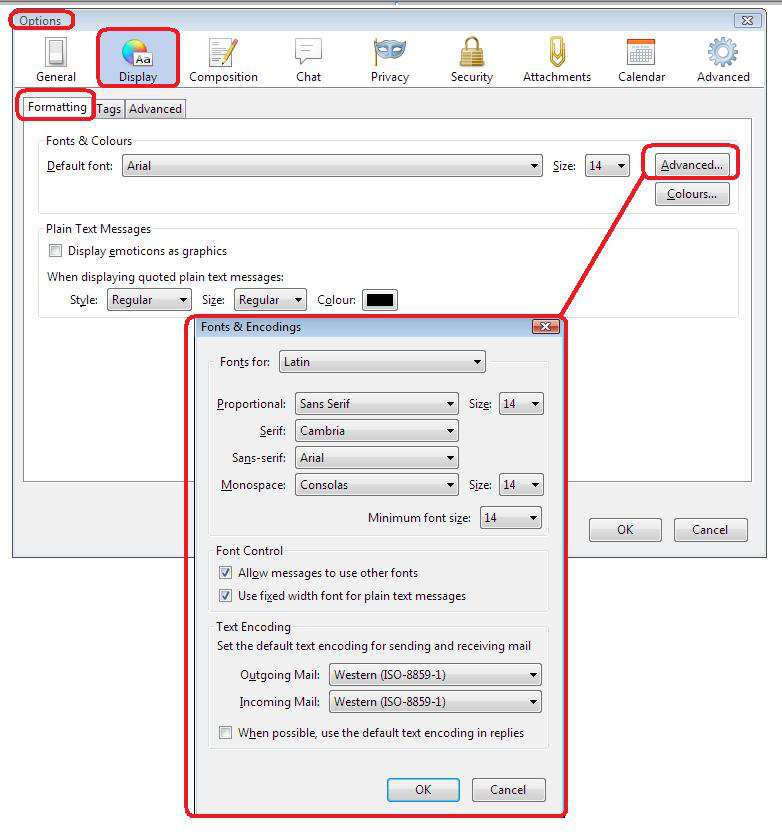
- Tools/Options/Display/'Formatting' tab
- click on 'Advanced' button
- This will show you the 'Fonts & Encodings' window.
This is where you need to look. See image below.
Изменено Toad-Hall
L.S.W. said
I go through Tools/options/advanced, but that only brings up choices about fonts. The necessary "Config.editor" never appears. I'm stymied.
Hello L.S.W.,
Does this look like one of the suggestions to fix the problem :
Go to the Configuration Editor (Tools, Options, Advanced, General, Config Editor). Scroll down to mail.strictly_mime Click on it and change it from "false" to true.
In that case you may have missed "General" ...... (?)
The problem was that I unwittingly was starting with my browser, Firefox, tools. When changing to Thunderbird everything fell into place. Sorry to bother people with my ineptitude. LSW