


I want to remove the search suggestions from the drop down menu in the address bar.

I just updated Firefox to 22.0 and now when I type something in the address bar, the drop down menu displays search suggestions. I used to be able to type a letter or two of the website I wanted to go to and just hit enter and Firefox would automatically take me there if it was the first thing in the list. However, now, it's more of a hassle because search suggestions show up along with items in my history. Is there a way to remove these suggested searches?
Soluție aleasă
I had the same problem. If you do have the swagbucks toolbar installed what you need to do is click the arrow to the right of the swagbucks icon and go to the "toolbar options". Under advanced settings there will be an option that says "enable search suggestions in address bar". Make sure that is not selected and your problem should be fixed.
Citește răspunsul în context 👍 1Toate răspunsurile (5)
I think those are talking about the search bar rather than the address bar unless I am misunderstanding them. And also, they seem to only work if your default search engine is Google, which mine is not.
In the attached picture, I'd like to be able to remove those three search suggestions from appearing. Also, before the update, my most visited items in my history were the first to display. Now, they seem to be in a different order. I'd like it if I could fix that as well.
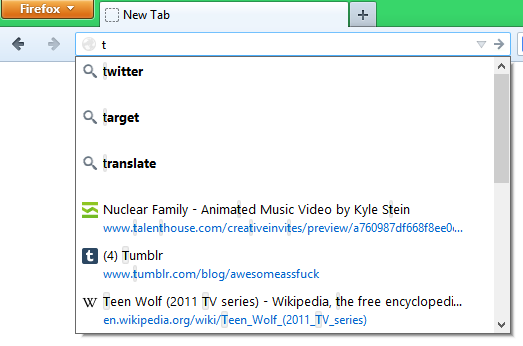
Modificat la de slimey01
Likely caused by the swagbucks extenstion.
Modificat la de kobe
Soluție aleasă
I had the same problem. If you do have the swagbucks toolbar installed what you need to do is click the arrow to the right of the swagbucks icon and go to the "toolbar options". Under advanced settings there will be an option that says "enable search suggestions in address bar". Make sure that is not selected and your problem should be fixed.
Hi, as far as i get the problem, the solutions is , first go to the options ,then click privacy , there at the bottom ,you will find a location bar ,in that column choose nothing . now your problem has been resolved.