


delete adress bar searches

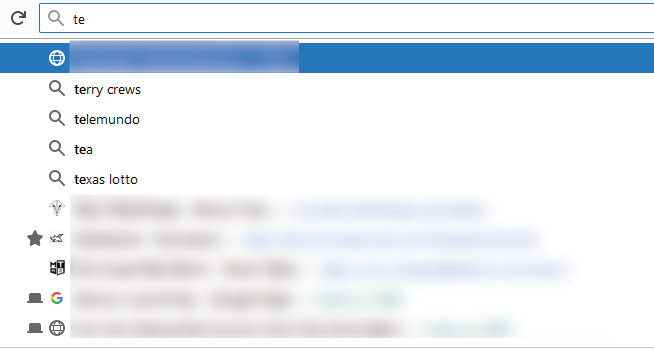
I am trying to clear search history in the address bar because it makes it very difficult to get the autocompleted pages I use regulary
I found the following article that says to:
click the down arrow, press the down button to select and highlight the entry, then press delete to delete it.
But this straight up does not work.
I can highlight and delete and as soon as i start typing again, it refills the search history results i just deleted.
I've cleared all search history everywhere I can find and still the address bar is offering search results from past searches
How can I get rid of them?! Thank you.
Soluție aleasă
To turn of the search suggestions in the Firefox address bar, do the following:
- Open the Firefox preferences or type
about:preferencesin the Firefox address bar - Go to the Search tab in the sidebar
- Go to the Default Search Engine section
- Uncheck the Provide search suggestions option
Hope this helps.
Citește răspunsul în context 👍 1Toate răspunsurile (2)
Soluție aleasă
To turn of the search suggestions in the Firefox address bar, do the following:
- Open the Firefox preferences or type
about:preferencesin the Firefox address bar - Go to the Search tab in the sidebar
- Go to the Default Search Engine section
- Uncheck the Provide search suggestions option
Hope this helps.

Type about:preferences#privacy<enter> in the address bar. The button next to History, select Use Custom Settings.
Turn on Remember My Browsing And Download History At the bottom of the page, turn on Clear History When Firefox Closes. At the far right, press the Settings button. Turn on ONLY Cache and Form And Search History leaving the others off.