


Yahoo health does not display tiles anymore

Until yesterday, yahoo health and other yahoo links would display tiles of photos which were links to other articles. As you I would scroll down, other tiles would appear (still does in IE). Now there are no tiles at the bottom of the page.
Toate răspunsurile (2)
Soluție aleasă
This is working fine for me in the same version of Firefox.
Try Firefox Safe Mode to see if the problem goes away. Firefox Safe Mode is a troubleshooting mode that temporarily turns off hardware acceleration, resets some settings, and disables add-ons (extensions and themes).
If Firefox is open, you can restart in Firefox Safe Mode from the Help menu:
- Click the menu button
 , click Help
 and select Restart with Add-ons Disabled.
If Firefox is not running, you can start Firefox in Safe Mode as follows:
- On Windows: Hold the Shift key when you open the Firefox desktop or Start menu shortcut.
- On Mac: Hold the option key while starting Firefox.
- On Linux: Quit Firefox, go to your Terminal and run firefox -safe-mode
(you may need to specify the Firefox installation path e.g. /usr/lib/firefox)
When the Firefox Safe Mode window appears, select "Start in Safe Mode".
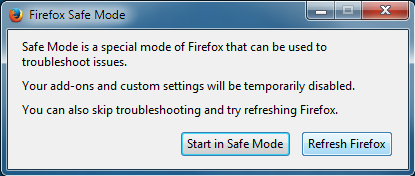
If the issue is not present in Firefox Safe Mode, your problem is probably caused by an extension, theme, or hardware acceleration. Please follow the steps in the Troubleshoot extensions, themes and hardware acceleration issues to solve common Firefox problems article to find the cause.
To exit Firefox Safe Mode, just close Firefox and wait a few seconds before opening Firefox for normal use again.
When you figure out what's causing your issues, please let us know. It might help others with the same problem.
There are other things that need attention:
Your System Details list shows that you have a user.js file in the profile folder to initialize prefs each time Firefox starts. The user.js file is only present if you or other software has created this file and normally it wouldn't be there.
You can check its content with a plain text editor (right-click: "Open with"; do not double-click). The user.js file is read each time Firefox is started and initializes preferences to the value specified in this file, so preferences set via user.js can only be changed temporarily for the current session.
You can delete the user.js file if you didn't create this file yourself.
You can use this button to go to the currently used Firefox profile folder:
- Help > Troubleshooting Information > Profile Directory: Show Folder (Linux: Open Directory; Mac: Show in Finder)
- http://kb.mozillazine.org/Profile_folder_-_Firefox
Windows hides some file extensions by default. Among them are .html and .ini and .js and .txt, so you may only see file name without file extension. You can see the real file type (file extension) in the properties of the file via the right-click context menu in Windows Explorer.