How do I remove secure connection from firefox coz it very annoying

When I reinstalled firefox, each time I open a website it bring this annoying security question.
This Connection is Untrusted You have asked Firefox to connect securely to support.mozilla.org, but we can't confirm that your connection is secure. What Should I Do? If you usually connect to this site without problems, this error could mean that someone is trying to impersonate the site, and you shouldn't continue.
Please help HOW TO REMOVE THIS SECURE CONNECTION
Todas as respostas (1)
hello emma, first please make sure that the date & time is set correctly on your system. if this doesn't solve the issue (or it is already set properly), a possible solution depends on different factors:
- what is the error code shown under technical details on the error page?
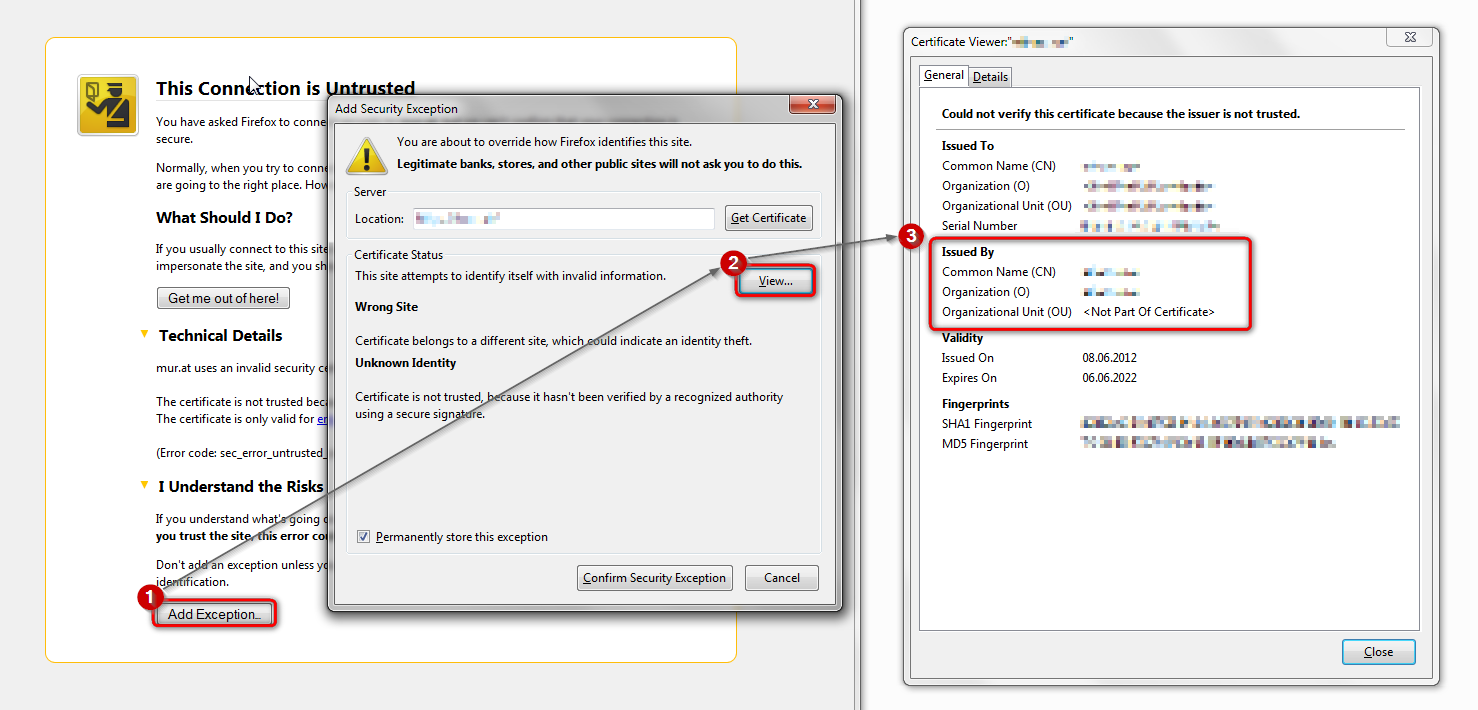
in case the error code equals sec_error_unknown_issuer, please attempt to add an exception on the bottom of the error page & inspect the certificate (see the screenshot attached for instructions):
- which issuer information does the certificate contain?
thank you!
"This Connection is Untrusted" error message appears - What to do