


How can I know WHICH cookie in the list is the one I want to delete?

OK, an unwanted, annoying cookie pops up. I go to the list of cookies in the Privacy section but I can't IDENTIFY the NAME of the cookie I want to delete. How can I tell its name?
Solução escolhida
it will take a restart of the browser for a deactivation of extensions to take effect.
Ler esta resposta no contexto 👍 1Todas as respostas (11)
OK, an unwanted, annoying cookie pops up.
Please post a screenshot. You are probably confused between cookie and popup window.
More Information:
Modificado por Manojit Ghosh a
See also:
You can check to cookies for the domain in the currently selected tab:
- Click the "Site Identity Button" (globe/padlock) on the location bar
- Click "More Information" to open "Page Info > Security"
- Click "View Cookies" to view the cookies for the domain in the currently selected tab
Also make sure that you do not get confused by messages from BetterPrivacy.
Modificado por cor-el a
Thanks for your help, cor-el. As a previous replier pointed out, it's probably POP-UP ADS that are bugging me, not cookies.
Screen shot attached.
Also I don't have a "Site Identity Button" (globe/padlock) on my location bar.
Still looking for help.
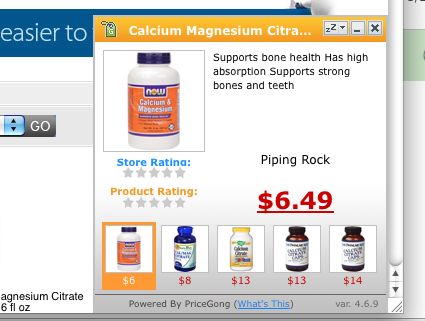
hello, go to tools > addons > extensions and disable/remove all toolbars, since they might contain adware.
Remove a toolbar that has taken over your Firefox search or home page
I'm a computer novice. I'm afraid that, if I disable a necessary good extension, I may not be able to get it back again. Or are these extensions just junk that I don't need anyway?
Screenshot attached. Thanks.
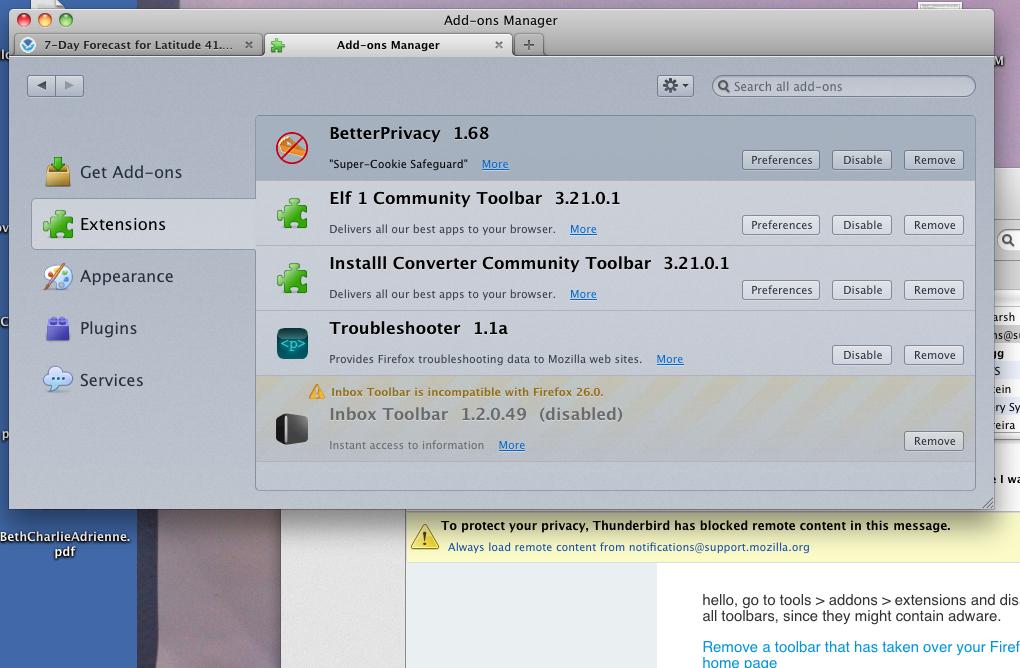
no extension is "necessary" in the true sense of the word (if you install firefox for the first time, it comes with no extension at all). in addition, if you are unsure about what those extensions are doing that is suspicious by itself, because only addons that got installed by you intentionally should be listed there. if you are unsure you can disable all those toolbar extensions in the first step though and see if this can address the issue - you can then also remove them later on.
Is this happening randomly or in a particular site?
It happens randomly. And I disabled those extensions and the problem still exists. But thank you for explaining extensions.
pop-up ads. randomly
Solução escolhida
it will take a restart of the browser for a deactivation of extensions to take effect.
Thank you Thank you Thank you!!!!!!