


Firefox built-in VPN data usage not showing
Hello. I recently started using the built-in VPN in Firefox.
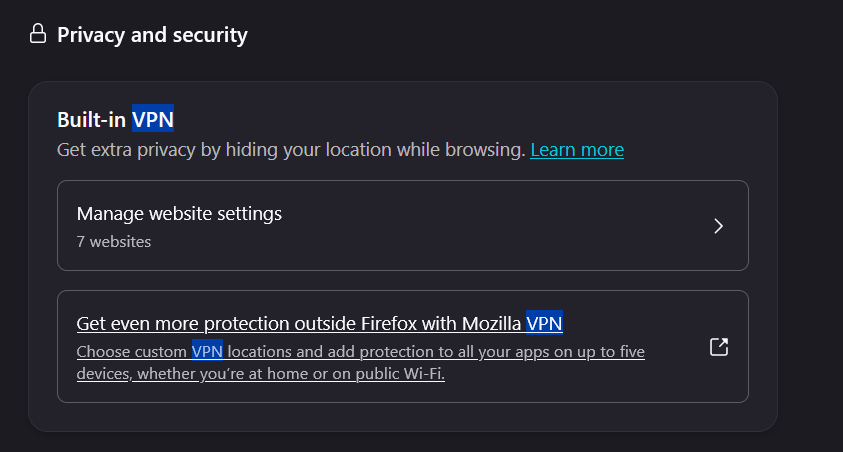
According to the Use built-in VPN in Firefox information page, I should be able to see the data usage in my Settings. However, when i look there, I can see "Manage websites" block and the "Get more protection" block, but I cannot see the "Monthly Data Limit" indicator that's supposed to sit between them.
I am running Firefox 152.0.4 on Windows 10
Am I looking in the right place for the VPN data usage? Is there another place to find the Data Usage?
Thank you.
References: Please see the attached screen cap, and compare to the image on the help page, https://support.mozilla.org/en-US/kb/built-in-vpn#w_understand-the-50-gb-data-limit
Todas as respostas (2)
According to the Use built-in VPN in Firefox information page, I should be able to see the data usage in my Settings. However, when i look there, I can see "Manage websites" block and the "Get more protection" block, but I cannot see the "Monthly Data Limit" indicator that's supposed to sit between them.
I guess you completely missed the banner on top of that kb article https://support.mozilla.org/en-US/kb/built-in-vpn
Now through August 31, get unlimited bandwidth with more locations in built-in VPN. Head to Connect for more details.
The unlimited period is from June 9th to August 31st and then Data usage will resume.
Modificado por James a