


Windows 10 reached EOS (end of support) on October 14, 2025. If you are on Windows 10, see this article.

Pesquisar no apoio

Evite burlas no apoio. Nunca iremos solicitar que telefone ou envie uma mensagem de texto para um número de telefone ou que partilhe informações pessoais. Por favor, reporte atividades suspeitas utilizando a opção "Reportar abuso".

Saber mais
Open

remove ONLINEINTERNETSPEEDTEST

Mark replied
scsbuy

Can't see how to delete the evil remove ONLINEINTERNETSPEEDTEST

Can't see how to delete the evil remove ONLINEINTERNETSPEEDTEST

Todas as respostas (1)

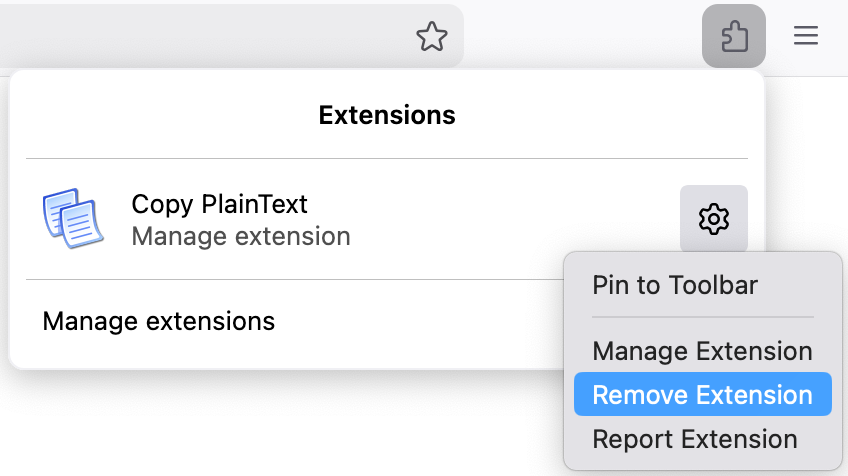
1. Go to your extensions list (click on the puzzle icon in the toolbar) 2. Click on the settings icon of the extension you want to delete 3. Click on Remove Extension

Here is a screenshot with an example extension that shows where I click:
Colocar questão

Deve iniciar a sessão com a sua conta para responder às mensagens. Por favor, comece uma nova pergunta, se ainda não tiver uma conta.