


Windows 10 reached EOS (end of support) on October 14, 2025. If you are on Windows 10, see this article.

Pesquisar no apoio

Evite burlas no apoio. Nunca iremos solicitar que telefone ou envie uma mensagem de texto para um número de telefone ou que partilhe informações pessoais. Por favor, reporte atividades suspeitas utilizando a opção "Reportar abuso".

Saber mais
Open

i build an automation tool by using your firefox dev addition but recently i am seeing this agree to terms popup i wanna know how can i stop that or agree to that with fags like start firefox with fags which disable or auto agree to that

TyDraniu replied
Vibeshiftbots

Hello,

I am building a browser automation tool using Firefox Developer Edition. Recently, I started running into an issue where an "Agree to Terms" (or Privacy/Welcome) popup appears when the browser launches.

Because this is an automated environment, this popup blocks my scripts from running properly because human interaction is required to click past it.

My Setup:

Browser: Firefox Developer Edition (latest version)

Use case: Automated testing/scripting

What I am trying to achieve: I need to know how to stop this popup from appearing entirely, or how to automatically agree to it. Are there specific command-line flags (similar to Chrome's startup flags) or about:config profile preferences I can inject when launching the browser to bypass this?

I have attached a screenshot of the exact popup I am seeing.

Any advice on the exact flags or preferences needed to silence this for automation would be greatly appreciated. Thank you!
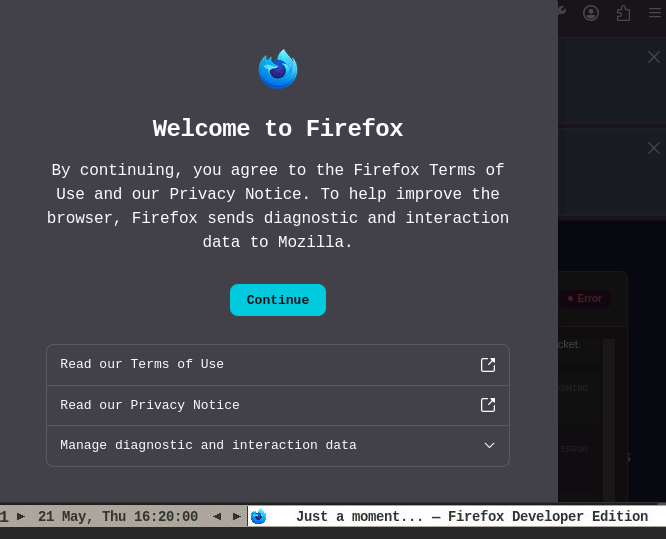
Hello, I am building a browser automation tool using Firefox Developer Edition. Recently, I started running into an issue where an "Agree to Terms" (or Privacy/Welcome) popup appears when the browser launches. Because this is an automated environment, this popup blocks my scripts from running properly because human interaction is required to click past it. My Setup: Browser: Firefox Developer Edition (latest version) Use case: Automated testing/scripting What I am trying to achieve: I need to know how to stop this popup from appearing entirely, or how to automatically agree to it. Are there specific command-line flags (similar to Chrome's startup flags) or about:config profile preferences I can inject when launching the browser to bypass this? I have attached a screenshot of the exact popup I am seeing. Any advice on the exact flags or preferences needed to silence this for automation would be greatly appreciated. Thank you!
Capturas de ecrã anexadas

Todas as respostas (1)

You have to set up the SkipTermsOfUse policy.

Colocar questão

Deve iniciar a sessão com a sua conta para responder às mensagens. Por favor, comece uma nova pergunta, se ainda não tiver uma conta.