


How to set Thunderbird to auto forward incoming mail to new address

I have current TBird in use but it is configured for use only on present PC (employer restriction). Is it possible to set Tbird to automatically forward all incoming emails to its inbox to a new account on gmail (not yet created, for temporary use on a laptop while I am in other countries) ? Really value all advice you can give me. I'm not a computer wizard!
Todas as respostas (3)

It is your email provider which does the forwarding. If forwarding from Gmail, set that up at https://mail.google.com/mail/u/0/#settings/fwdandpop.
Question must have been unclear. I wish to do the REVERSE of your suggestion. I use Thunderbird exclusively at present. I wish to enable this Thunderbird to automatically forward the emails it receives after a specific date (not yet fixed) to a gmail account which I will create in the future when it it is needed to receive the messages forwarded from T-Bird. I do not currently have a gmail account! To give context: I will be moving to countries shortly and will be unable to access T-Bird when away. So I will create a gmail account to receive forwarded emails from T-Bird. Basically, does T-Bird have an "automatic forward of new mail" feature, and if so where is it and how do I set it up? NB the servers for "yorku.ca" are controlled by the University so I cannot ask them to do anything for me!
Gotcha. Use a filter - https://support.mozilla.org/en-US/kb/organize-your-messages-using-filters.
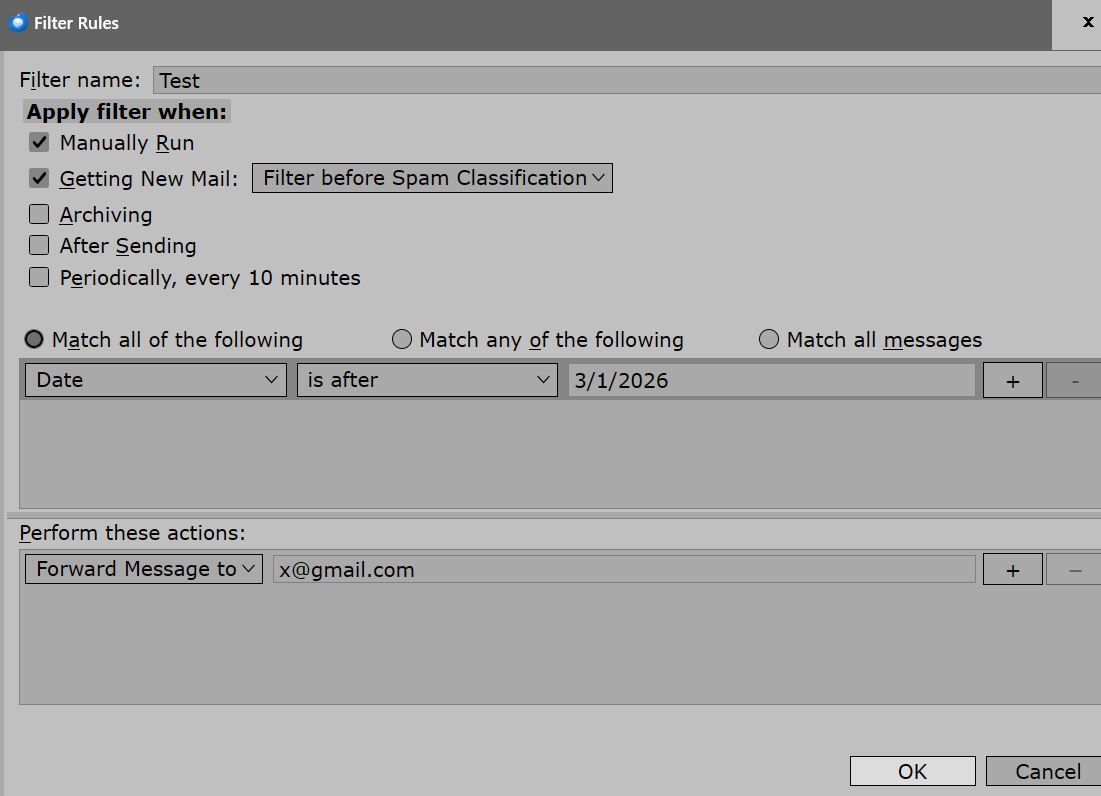
Modificado por Ed a