


Sent folder
I have been a Thunderbird user since way back in the Netscape days.
(1) I wrote about this a week or two ago.
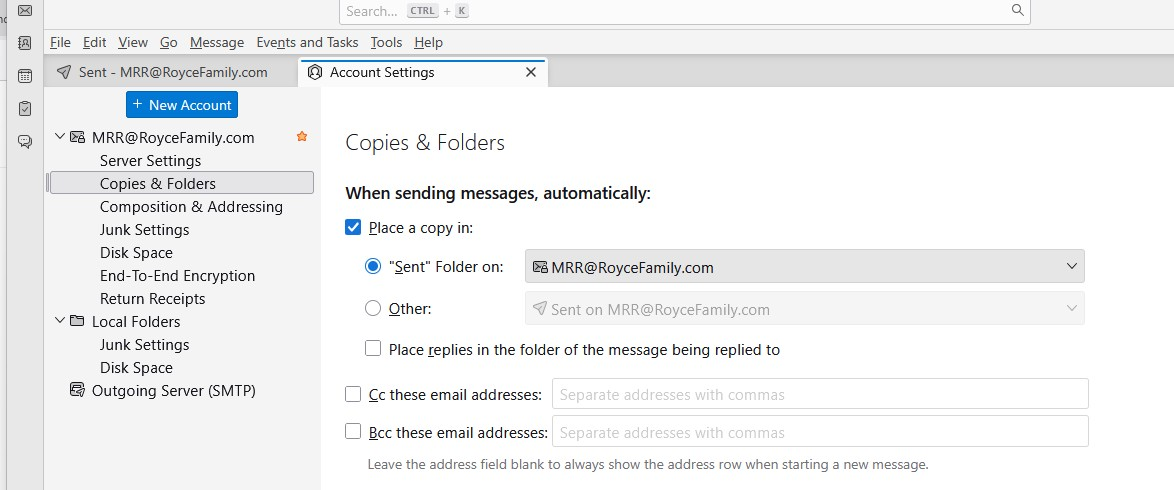
My "SENT" messages STOP going into the "SENT" folder.
I can reset it by going to Tools / Account Settings / Copies & Folders and pushing the "Other" button & back to the "Sent" folder. Last time, the reset lasted a week or two. I don't know I have the problem until I try to find a sent message and it is not there.
(2) On my Wife's Thunderbird, when she has pushed the "Spam" button for a message in the "Inbox" - The message does go to the "Spam" folder.
How does she mark them as "Not Junk" ?
She marks ALL of the messages she wants back in the "Inbox" - BUT - The messages she has tried to make "Not Junk" continue going to the "Spam" folder the next time received.
Todas as respostas (1)
1. Sent
The settings you have set up are correct for a Pop account. You should not be needing to alter anything.
Possible reasons for a setting not being recognised. You have a program on your computer that cleans up temp files, session files, cache etc. Products such as CCleaner or WiseCleaner or even some Anti-Virus products can 'clean up' files. It means something could be messing about in places where they should not be allowed and it can cause a nuisance. If you have installed such a program then you need to access it and make an exception to not have access to your Thunderbird profile. That includes any Anti-Virus. Anti-Virus can cause problems because if allowed to scan and auto fix files, they could cause major data loss. AV's have no concept that one simple text file may contain more than one email. So a fix may mean delete the contents of file. If you have had Thunderbird for a while then it's likely the Thunderbird folder that needs being make exempt from scanning is here:
- C:Users/username/Appdata/Roaming/Thunderbird
The 'Sent' folder does not display items because the index file does not match the real contents in the mbox file.
- Right click on 'Sent' folder and select 'Properties'
- Click on 'Repair Folder'
- click on 'OK'