


Repeated small window asking for primary password

When I open Firefox, I get a small window asking for a primary password and I find no where to get rid of this. I have a Mozilla password, but that one does not work in the small window.
Solução escolhida
Could you try the steps in this article (or the articles it links to):
Firefox keeps asking me for Primary Password
Ler esta resposta no contexto 👍 0Todas as respostas (10)
As far as I know, a Primary Password is normally something you would need to set yourself. You are correct that it is a different password than your Mozilla Account password.
I certainly don't remember setting one and I cannot find where to do so or to remove.
Solução escolhida
Could you try the steps in this article (or the articles it links to):
Can anyone lay out the procedure for setting and removing a primary password? I did not do this and do not know how it happened, so I am searching.
There is a checkbox on the Settings page:
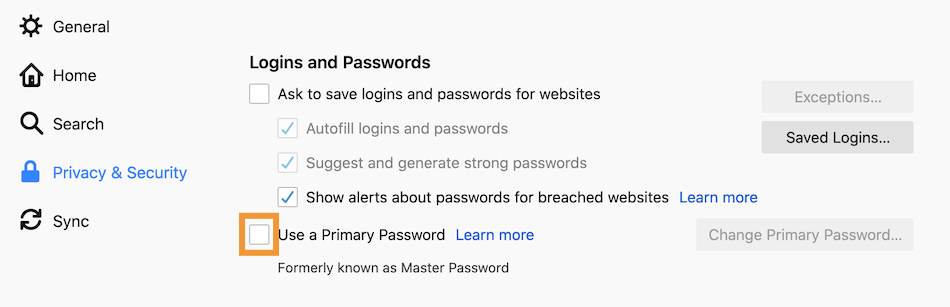
If that box is checked, un-check it to remove the password. If you don't know what password to enter to remove it, try using the reset form:
(1) Open a new window (Ctrl+N)
(2) Type or paste the following strange address into the address bar:
chrome://pippki/content/resetpassword.xhtml
(3) Proceed with the reset, understanding that it will clear any saved logins
In order to uncheck the "Use primary password", you need the password to complete this action. I don't know that password!
Did you end up using the Reset tool?
Yes. And that was a mistake because it also deleted all of my saved passwords.
Sadly, that is normal. Do you have any backups of your Firefox profile folder(s)?
If not:
Windows itself may have captured a copy of older logins when it updated itself. This is called a shadow copy, and you can explore for one using either of the following tools. They unfortunately do not seem to always recover a readable file, but you certainly can give it a try:
(1) Set Windows to show hidden files and folders, if you haven't done this before:
(2) Download and install one of the following programs:
- ShadowExplorer: http://www.shadowexplorer.com/
- Shadow Copy View: https://www.nirsoft.net/utils/shadow_copy_view.html
(3) Start up the program and look for the latest restore point. Then explore along this path to see whether you can find a shadow copy of your profile:
\Users\your-user-name\AppData\Roaming\Mozilla\Firefox\Profiles\your.profile
(4) Export out the logins.json and key4.db files to your Windows desktop. While Firefox is closed, you can substitute these for the empty/post-reset files in your active profile. (Profiles - Where Firefox stores your bookmarks, passwords and other user data)
Anything usable there?
I deleted Firefox and all registry entries for Firefox and Mozilla then reinstalled Firefox. It somehow brought back previous Firefox files which brought back the primary password window. I had hoped not. Deleting the checkmark for Use primary password was a mistake for losing all stored passwords but I have those in my own files. I will do nothing else.