


Windows 10 reached EOS (end of support) on October 14, 2025. If you are on Windows 10, see this article.

Pesquisar no apoio

Evite burlas no apoio. Nunca iremos solicitar que telefone ou envie uma mensagem de texto para um número de telefone ou que partilhe informações pessoais. Por favor, reporte atividades suspeitas utilizando a opção "Reportar abuso".

Saber mais
Arquivadas

Move to "Inbox" Again - Logic is unclear (bug1982162)

schro.cat

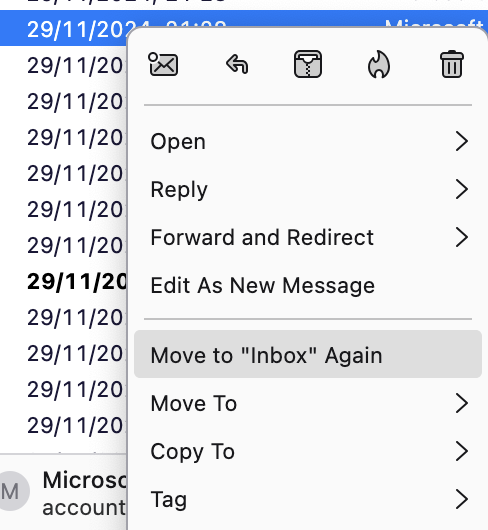
When right-clicking on an email (RMB), I see the option "Move to Inbox Again." However, the logic behind this option is unclear.

I've noticed that some emails initially arrive in my unified inbox (due to multiple accounts being set up), but after some time—perhaps up to a day—they are moved to the Junk folder. This behavior started around six months ago. I've been using Thunderbird for a long time and regularly update it, so this issue is relatively recent and quite noticeable.

Previously, the "Move to Inbox Again" option was useful for retrieving legitimate emails that were wrongly marked as junk. I would open the Junk folder, highlight the non-junk emails, right-click, and select the option. Thunderbird would then move each email back to its respective account's inbox, as expected.

However, recently I've noticed that when multiple emails are selected, they are all moved to the inbox of the first accountlisted among the selected messages, rather than returning to their original inboxes. This is a clear deviation from the previous behavior and leads to confusion and misplacement of messages.

Additionally, this option appears even when an email is already in the inbox. In such cases, selecting "Move to Inbox Again" moves the email to the default account's inbox, which doesn’t make much sense. In my opinion, this option should either be disabled or removed when the email is already in an inbox folder.
When right-clicking on an email (RMB), I see the option "Move to Inbox Again." However, the logic behind this option is unclear. I've noticed that some emails initially arrive in my unified inbox (due to multiple accounts being set up), but after some time—perhaps up to a day—they are moved to the Junk folder. This behavior started around six months ago. I've been using Thunderbird for a long time and regularly update it, so this issue is relatively recent and quite noticeable. Previously, the "Move to Inbox Again" option was useful for retrieving legitimate emails that were wrongly marked as junk. I would open the Junk folder, highlight the non-junk emails, right-click, and select the option. Thunderbird would then move each email back to its respective account's inbox, as expected. However, recently I've noticed that when multiple emails are selected, they are all moved to the inbox of the first accountlisted among the selected messages, rather than returning to their original inboxes. This is a clear deviation from the previous behavior and leads to confusion and misplacement of messages. Additionally, this option appears even when an email is already in the inbox. In such cases, selecting "Move to Inbox Again" moves the email to the default account's inbox, which doesn’t make much sense. In my opinion, this option should either be disabled or removed when the email is already in an inbox folder.
Capturas de ecrã anexadas

Modificado por Wayne Mery a

Todas as respostas (1)