Windows 10 reached EOS (end of support) on October 14, 2025. If you are on Windows 10, see this article.

Pesquisar no apoio

Evite burlas no apoio. Nunca iremos solicitar que telefone ou envie uma mensagem de texto para um número de telefone ou que partilhe informações pessoais. Por favor, reporte atividades suspeitas utilizando a opção "Reportar abuso".

Saber mais

Disable session restore does not work

  • 1 resposta
  • 1 tem este problema
  • 382 visualizações
  • Última resposta por jonzn4SUSE

I would like to disable automatic session restore completely. When I restart my PC, crashes or anything like that, I do not want Firefox to restore my previously opened tabs or windows. When I open firefox after a system reboot / crash, I want to only open my default home page. Only if I manually click History > Restore Previous Session should firefox ever restore my session, otherwise never restore my sessions.

I tried unchecking Settings > Startup > Open previous windows and tabs, and also tried following this article: https://support.mozilla.org/en-US/questions/1182594

My sessions still restores after my computer restarts or crashes.

Why do I want this? When I reboot my computer, I want a clean slate to start from scratch, not the dozens of pages (and other software) I had open from my previous session.

I am running linux mint btw.

I would like to disable automatic session restore completely. When I restart my PC, crashes or anything like that, I do not want Firefox to restore my previously opened tabs or windows. When I open firefox after a system reboot / crash, I want to only open my default home page. Only if I manually click ''History > Restore Previous Session ''should firefox ever restore my session, otherwise never restore my sessions. I tried unchecking ''Settings > Startup > Open previous windows and tabs'', and also tried following this article: https://support.mozilla.org/en-US/questions/1182594 My sessions still restores after my computer restarts or crashes. Why do I want this? When I reboot my computer, I want a clean slate to start from scratch, not the dozens of pages (and other software) I had open from my previous session. I am running linux mint btw.

Capturas de ecrã anexadas

Todas as respostas (1)

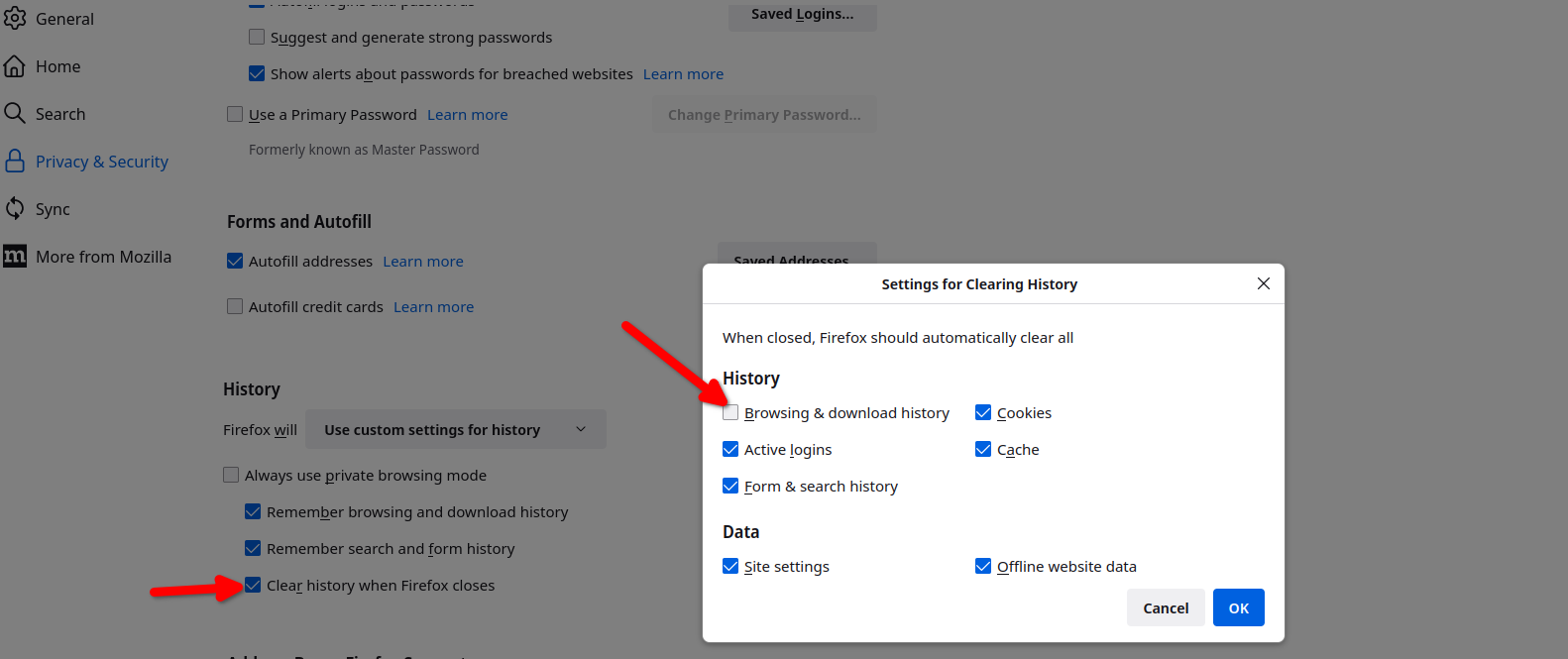
You can also set Firefox to not remember browser history. see screenshot