


Windows 10 reached EOS (end of support) on October 14, 2025. If you are on Windows 10, see this article.

Pesquisar no apoio

Evite burlas no apoio. Nunca iremos solicitar que telefone ou envie uma mensagem de texto para um número de telefone ou que partilhe informações pessoais. Por favor, reporte atividades suspeitas utilizando a opção "Reportar abuso".

Saber mais
Solved Arquivadas

Menu bar changes in v140.0.1esr eclipse

sfhowes replied
Ken Wolfe

In the new 140.0.1esr eclipse version the menu bar has lost Tools. When I right click and go to "Customize toolbar" there is not an option to add either 'Tools' or 'Message Filters', the later being what I would prefer to add to the tool bar (see attached image). I now have to click the hamburger icon -> select Tools -> Message Filters. If I could add 'Tools' or 'Message Filters' into the menu bar (for Mail messages since there are segregated menu bars now) it would be so much easier. I use the Message Filters function frequently so having to go through several steps to get to it now is very inconvenient in this new version.
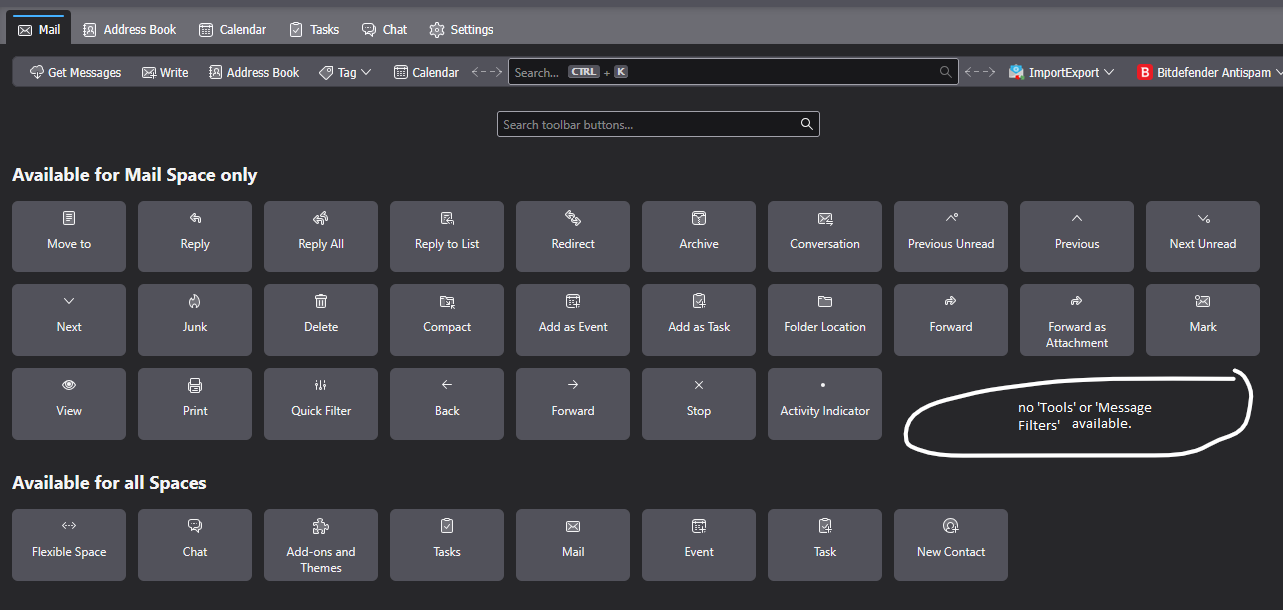
In the new 140.0.1esr eclipse version the menu bar has lost Tools. When I right click and go to "Customize toolbar" there is not an option to add either 'Tools' or 'Message Filters', the later being what I would prefer to add to the tool bar (see attached image). I now have to click the hamburger icon -> select Tools -> Message Filters. If I could add 'Tools' or 'Message Filters' into the menu bar (for Mail messages since there are segregated menu bars now) it would be so much easier. I use the Message Filters function frequently so having to go through several steps to get to it now is very inconvenient in this new version.
Capturas de ecrã anexadas

Todas as respostas (1)

Solução escolhida

The toolbar you're trying to customize is actually the Unified bar. If the Menu Bar with Tools is hidden, press Alt and make it permanently visible under View/Toolbars.