


Downloads button not opening file in application

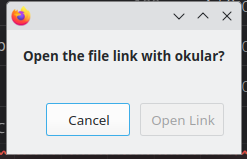
When I was previously using Firefox in Kubuntu 22.04, if I downloaded something I could go to the Downloads icon and click on the download and it would open in the desired application. After a failed upgrade to 24.04 I had to do a reinstall and now in Kubuntu 24.04, if I click on a downloaded file it will always bring up a window with "Open the file link with okular?" and the buttons Cancel and Open Link below. How do I go back to the previous way of it working?
When I was previously using Firefox in Kubuntu 22.04, if I downloaded something I could go to the Downloads icon and click on the download and it would open in the desired application.
After a failed upgrade to 24.04 I had to do a reinstall and now in Kubuntu 24.04, if I click on a downloaded file it will always bring up a window with "Open the file link with okular?" and the buttons Cancel and Open Link below.
How do I go back to the previous way of it working?
Solução escolhida
This was due to the apparmor rule pointing to /usr/lib/firefox instead of /usr/bin/firefox
Ler esta resposta no contexto 👍 0Todas as respostas (2)
Solução escolhida
This was due to the apparmor rule pointing to /usr/lib/firefox instead of /usr/bin/firefox
Mark, Thank you for posting your solution.