


Sort view (of all folders) by 'unthreaded' as default

It has been asked several times already, but all threads seem to just be archived without any proper response. How can one set for all folders and all messages (not just new ones) the default view permanently to 'unthreaded'?
Todas as respostas (4)
This is the official (to my knowledge) documentation. Well worth the read https://support.mozilla.org/en-US/kb/message-threading-thunderbird
Here in more detail:
FOR NEW FOLDERS To change default for *new* folders, In config editor, you can change default that applies to NEW folders you set up: mailnews.default_view_flags 0 =unthreaded
Config editor is available at Tools>settings>general and scroll to bottom right.
FOR CURRENT FOLDERS
These steps may help: To set many *existing* folders, follow these steps: This must be done on an account by account basis.
- select table view - the icon just to right of 'quick filter' button above message list pane
- select a message folder and apply all desired attributes - View>sort by from menu bar (if not shown, click alt key)
- click the icon at right side of column display in message list pane
- select the entry near bottom 'Apply current view to...'
- highlight 'folder and children'
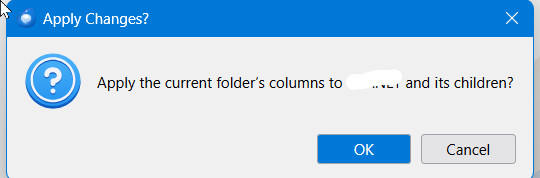
- move mouse left to see account name and move left again to display all account folders. Now CLICK. a small menu will appear to confirm setting all folders within that account.
FOR FUTURE SETUPS
ALSO, for future installations of Thunderbird, - create a simple text file with name of user.js with these lines:
   // Set default threading to UNthreaded  ###   <== this line is optional, just for documentation
   user_pref("mailnews.default_view_flags", 0);
- install Thunderbird and exit prior to setting up accounts
- copy the user.js file into the profile
- now, when you start Thunderbird, unthreading will be the default. Problem solved.
Modificado por david a
david said
FOR CURRENT FOLDERS These steps may help: To set many *existing* folders, follow these steps: This must be done on an account by account basis.
- select table view - the icon just to right of 'quick filter' button above message list pane
- select a message folder and apply all desired attributes - View>sort by from menu bar (if not shown, click alt key)
- click the icon at right side of column display in message list pane
- select the entry near bottom 'Apply current view to...'
- highlight 'folder and children'
- move mouse left to see account name and move left again to display all account folders. Now CLICK. a small menu will appear to confirm setting all folders within that account.
I followed all these steps but at the last one, I did not get the "small menu" to confirm setting all the folders in the account. What is the small menu supposed to look like? Also, I prefer "Cards view"; is there a way to do this, but using Cards view?
Modificado por Trisha Lynn a
Be sure to highlight the account name and then click enter key. sample 'small menu' attached.

In version 136, one can set the default for future folders in general settings.
Step 6 above should be: Click on the account name. A small *window* will appear and ask for confirmation.