


Windows 10 reached EOS (end of support) on October 14, 2025. If you are on Windows 10, see this article.

Pesquisar no apoio

Evite burlas no apoio. Nunca iremos solicitar que telefone ou envie uma mensagem de texto para um número de telefone ou que partilhe informações pessoais. Por favor, reporte atividades suspeitas utilizando a opção "Reportar abuso".

Saber mais
Arquivadas

Account setup on new computer - add security exception

Richard

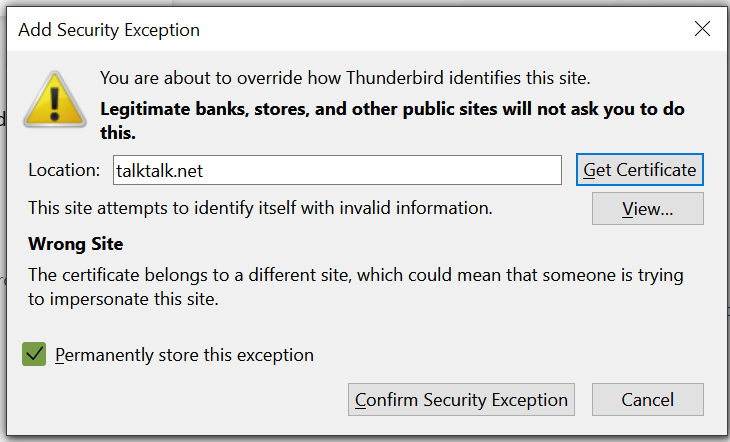
I have TB installed on an older laptop, working well. I downloaded and installed TB on a new Windows laptop. When the auto setup runs to set up the first email account, the server settings are identified and "Account successfully created" is shown. Then Add Security Exception dialog pops up, preloaded with talktalk.net in the Location box. A message reads "Wong site - The certificate belongs to a different site, which could mean that someone is trying to impersonate this site." "permanently store this exception" box is ticked. The "Get Certificate" button does nothing. I am invited to "Confirm security exception." It sounds wrong - what am I supposed to do?
I have TB installed on an older laptop, working well. I downloaded and installed TB on a new Windows laptop. When the auto setup runs to set up the first email account, the server settings are identified and "Account successfully created" is shown. Then Add Security Exception dialog pops up, preloaded with talktalk.net in the Location box. A message reads "Wong site - The certificate belongs to a different site, which could mean that someone is trying to impersonate this site." "permanently store this exception" box is ticked. The "Get Certificate" button does nothing. I am invited to "Confirm security exception." It sounds wrong - what am I supposed to do?
Capturas de ecrã anexadas

Todas as respostas (1)

Using an anti virus to scan your mail? Most of them substitute their own self signed certificates leaving problems with requests to add exceptions.

Have a look at the issuer in the view button.