


Incorrect SSL_ERROR_BAD_CERT_DOMAIN Error raised

Firefox giving following error,
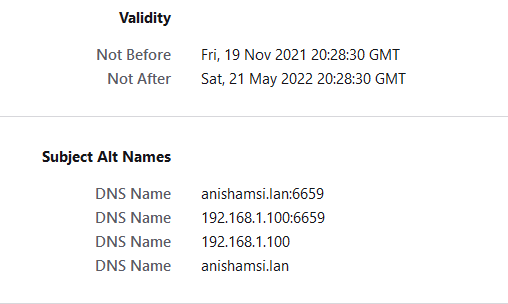
Websites prove their identity via certificates. Firefox does not trust this site because it uses a certificate that is not valid for 192.168.1.100. The certificate is only valid for the following names: anishamsi.lan:6659, 192.168.1.100:6659, 192.168.1.100, anishamsi.lan
I can see the url is there as listed by firefox error itself (verify with screenshot 1), the url is "https://192.168.1.100/api/validateLogin"
please see the screenshot as well. First screenshot is for the error, second is for the certificate returned by the website and as shown by firefox.
What is the error, i have created the certificate correctly. i am sure this is a bug in firefox?? If not!!! how u suggest i fix this i have added following alt names inside my csr. DNS.1 =anishamsi.lan:6659 DNS.2 =192.168.1.100:6659 DNS.3 =192.168.1.100 I have already uploaded the certificate at names screenshot.

Todas as respostas (1)

- MOZILLA_PKIX_ERROR_MITM_DETECTED
- uses an invalid security certificate SSL_ERROR_BAD_CERT_DOMAIN
- configured their website improperly
How to troubleshoot the error code "SEC_ERROR_UNKNOWN_ISSUER" on secure websites https://support.mozilla.org/en-US/kb/troubleshoot-SEC_ERROR_UNKNOWN_ISSUER
There is security software like Avast, Kaspersky, BitDefender and ESET that
intercept secure connection certificates and send their own.
https://support.mozilla.org/en-US/kb/firefox-cant-load-websites-other-browsers-can
https://support.mozilla.org/en-US/kb/firefox-and-other-browsers-cant-load-websites
https://support.mozilla.org/en-US/kb/secure-connection-failed-firefox-did-not-connect
https://support.mozilla.org/en-US/kb/websites-dont-load-troubleshoot-and-fix-errors