

Esta discussão foi arquivada.
Se precisar de ajuda, por favor, coloque uma nova questão.

Resolvido
Arquivadas
There's NO home icon next to the round refresh icon on top left of menu bar

Hello. I've just recently refreshed Firefox. Before I did that, I had a home icon next to the round refresh icon on the upper left of the menu. Now I don't have it. And I can' click to the home icon to get a new home page of Firefox! And I am NOT a happy camper. Did you all forget to put that on there or what?
Yes, I am fully aware that I can click the plus sign to get a new page. But I love the home page icon. Is it coming back by any chance?
Hello. I've just recently refreshed Firefox. Before I did that, I had a home icon next to the round refresh icon on the upper left of the menu. Now I don't have it. And I can' click to the home icon to get a new home page of Firefox! And I am NOT a happy camper. Did you all forget to put that on there or what?
Yes, I am fully aware that I can click the plus sign to get a new page. But I love the home page icon. Is it coming back by any chance?
Todas as respostas (2)
Solução escolhida
- Click the menu button
 , click More Tools… and choose Customize Toolbar….
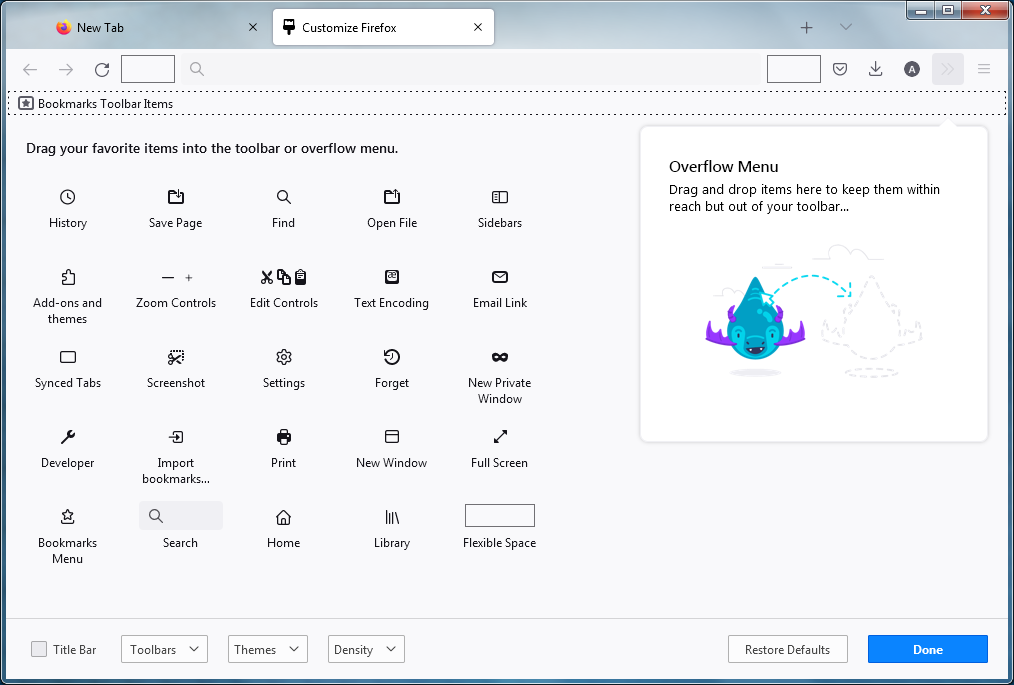
- A special tab will open which allows you to drag and drop items in or out of the overflow menu and the toolbar.
- Drag&drop the Home button on your toolbar.
- When you are done, click the Done button.
ljsmom said
Hello. I've just recently refreshed Firefox. Before I did that, I had a home icon next to the round refresh icon on the upper left of the menu. Now I don't have it. And I can't click to the home icon to get a new home page of Firefox! And I am NOT a happy camper. Did you all forget to put that on there or what? Yes, I am fully aware that I can click the plus sign to get a new page. But I love the home page icon. Is it coming back by any chance?