


Windows 10 reached EOS (end of support) on October 14, 2025. If you are on Windows 10, see this article.

Pesquisar no apoio

Evite burlas no apoio. Nunca iremos solicitar que telefone ou envie uma mensagem de texto para um número de telefone ou que partilhe informações pessoais. Por favor, reporte atividades suspeitas utilizando a opção "Reportar abuso".

Saber mais

Can't tick "Ask to save logins and passwords for web site"

  • 1 resposta
  • 1 tem este problema
  • 29 visualizações
  • Última resposta por cor-el

Hi All,

I'm using Firefox v91.0. I have all my passwords saved in Lockwise. I have Trend security enabled. When i go to my browser, i have to check the box "Ask to save logins and passwords for web site" each time i start up my laptop. Yesterday however, when i go to this, I'm unable to check the box. When i click on it, it flicks between showing "Autofill logins and passwords" and "Suggest and generate strong passwords" being normal and greyed out. But i can't check the box.

All my logins are still saved and i dont have private browsing enabled.

It's really weird because i've not made any changes whatsoever. I've looked at the resources/solutions here and can't find it...any help would be appreciated.

Thanks....
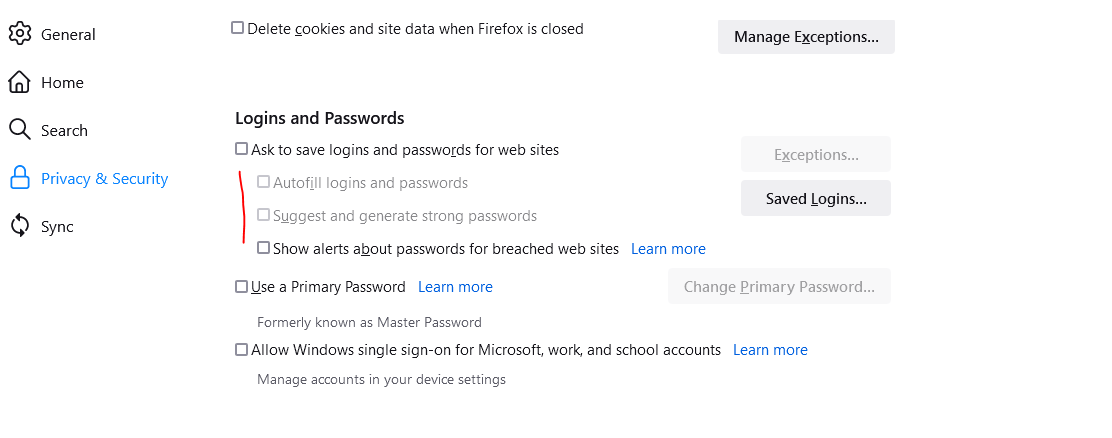
Hi All, I'm using Firefox v91.0. I have all my passwords saved in Lockwise. I have Trend security enabled. When i go to my browser, i have to check the box "Ask to save logins and passwords for web site" each time i start up my laptop. Yesterday however, when i go to this, I'm unable to check the box. When i click on it, it flicks between showing "Autofill logins and passwords" and "Suggest and generate strong passwords" being normal and greyed out. But i can't check the box. All my logins are still saved and i dont have private browsing enabled. It's really weird because i've not made any changes whatsoever. I've looked at the resources/solutions here and can't find it...any help would be appreciated. Thanks....
Capturas de ecrã anexadas

Todas as respostas (1)

You can't have multiple Password Managers enabled at the same time, so if you have others like RoboForm or Trend Micro Password Manager then the builtin Firefox Lockwise Password Manager will be disabled.

If you have the "Trend Micro Password Manager" installed then uninstall this application via the Windows Control Panel.