


Disabled address bar autocomplete ads
Hello,
When I type in the address bar it autocompletes with addresses i've never visited, looks like ads to me.
For example: - ac => accuweather.com - ab => about.com - ad => adobe.com
I've tried different search engines and it always gives me the same result, so I guess its from Firefox directly ?
How do I turn that off ? I've tried "Settings > Search > Show suggestions" but it's doesn't change anything
Todas as respostas (4)
Hello,
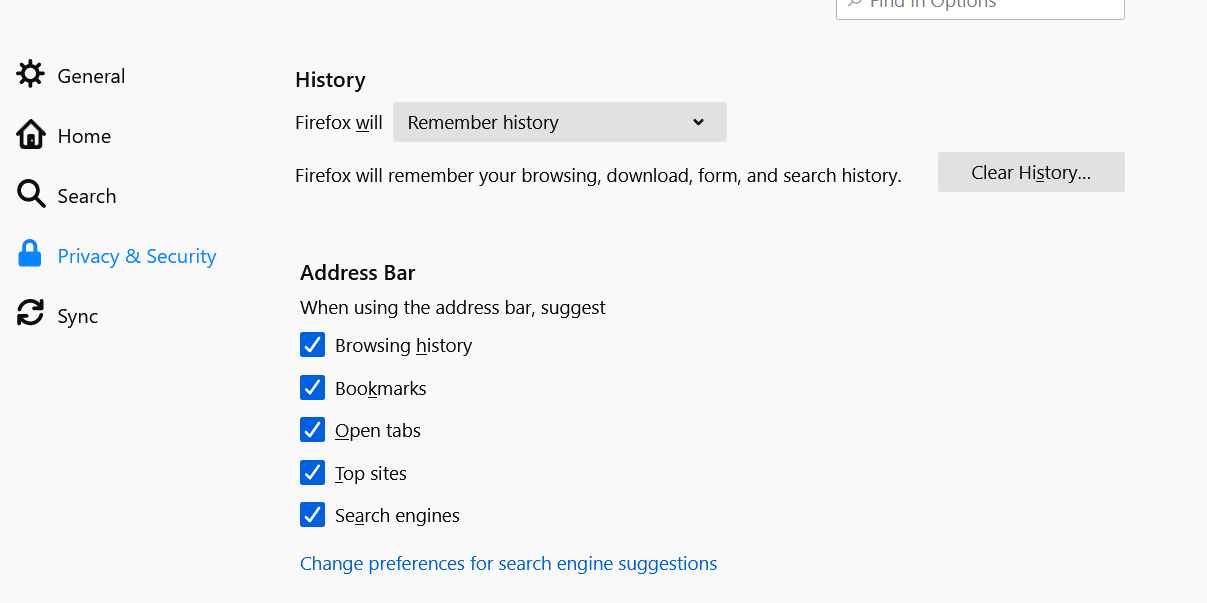
you can also try: Setting -> Privacy & Security -> Address Bar
Hello Alissa,
Thanks for your help. I'm using the iOS version, I don't see any "Address bar" entry in the settings menu
Modificado por trouba a
Hello again,
I use the window version, but have you checked out the Privacy & Security section? Address Bar is in that section. If I confuse you, please look at the attached image!
This section doesn't exist on the ios app, so maybe there is no way to deactivate popular sites from the address bar, guess it's time to find a new browser, thanks for your help