


subject line

how can I make every subject line, in every folder bigger?
Solução escolhida
it was complicated coz of these bookmarks of sfhowes,your step by step advice was/is a good idea and now i am very glad...many thanks for that...
Ler esta resposta no contexto 👍 0Todas as respostas (4)
To increase all the fonts, see this topic about changing a single preference:
https://support.mozilla.org/en-US/questions/1269361
The discussion includes a method to adjust just the Subject line (Threads Pane font) with css:
https://support.mozilla.org/en-US/questions/1269361?page=2#answer-1274848
too complicated.. i hope the new update will make it easy to adjust it...
What is too complicated ?
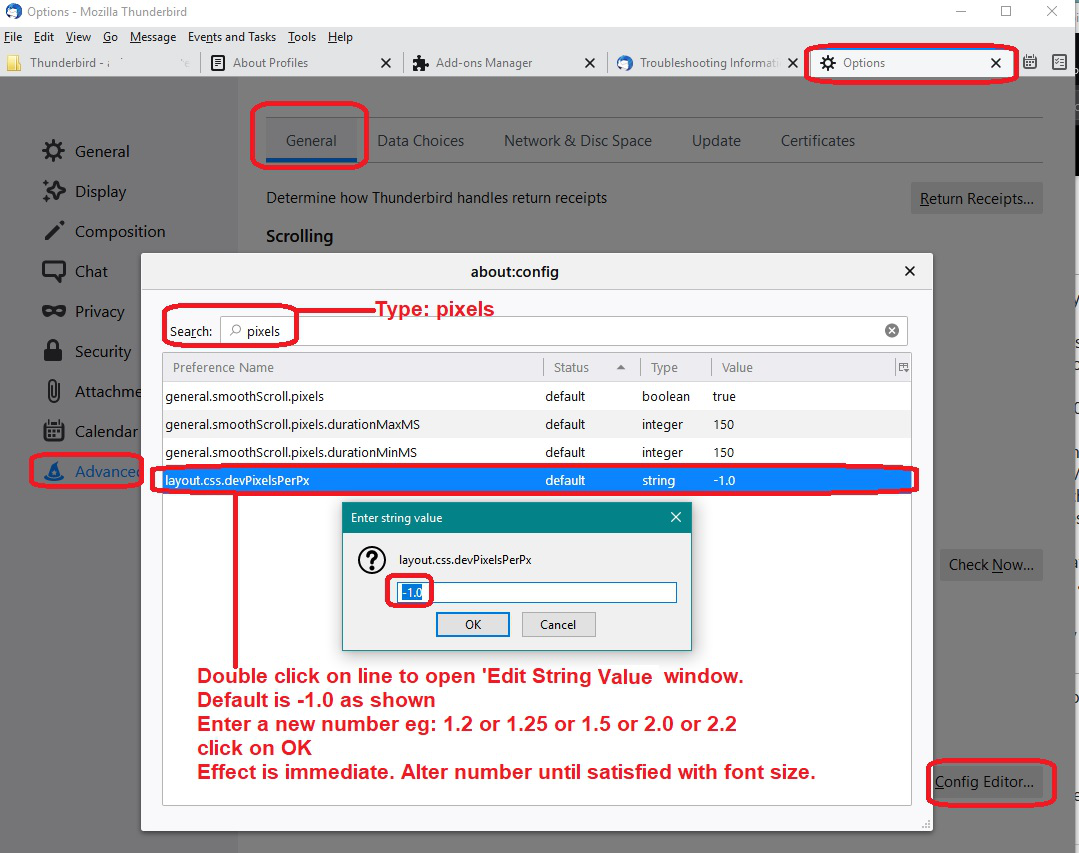
To increase font size in the UI is not complicated. Look at the image below to see how simple it is.
- Menu app icon > Options > Advanced > 'General' tab
- click on 'Config Editor' button and accept risk.
- TYpe : pixels
- double click on line :layout.css.devPixelsPerPx
- Enter a new number eg: 1.5 and click on OK
It will show instant effect, so it's easy to adjust the number until it suits you.
Solução escolhida
it was complicated coz of these bookmarks of sfhowes,your step by step advice was/is a good idea and now i am very glad...many thanks for that...