


RoboForm Submenus popup in wrong location
Firefox 78.0.2 64-bit RoboForm 8.9.0.0 Standard laptop display
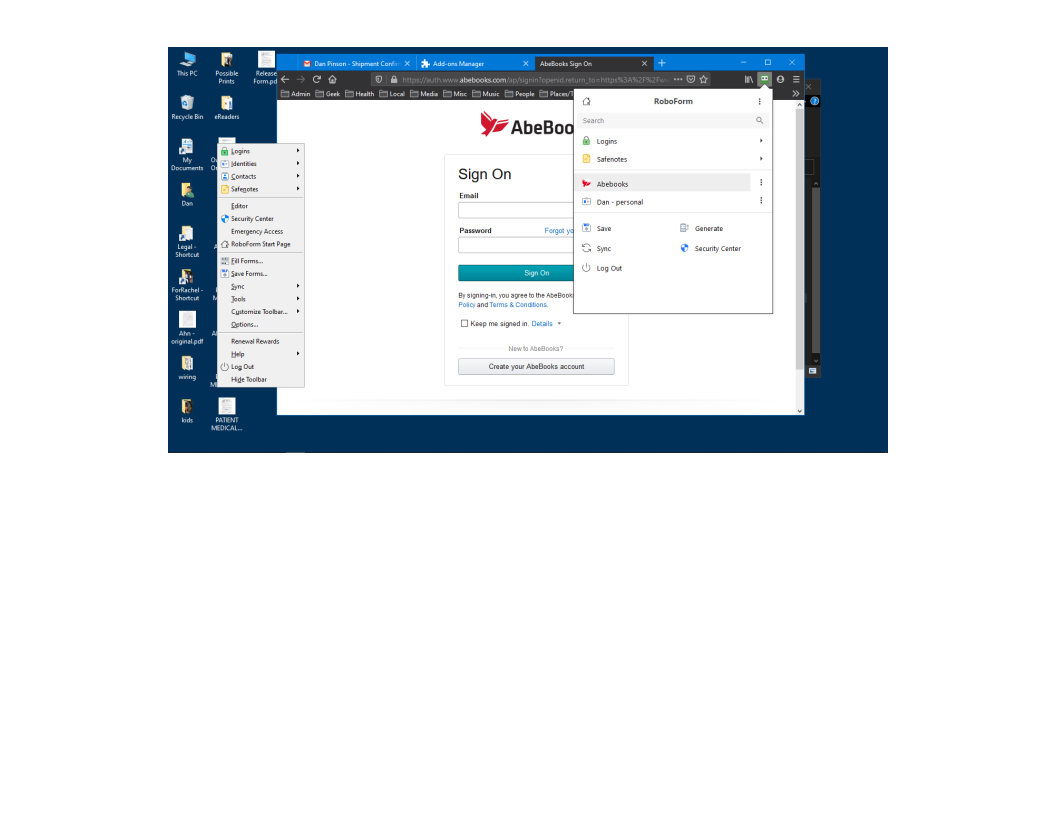
Problem When I click on the RoboForm icon (which appears on the far right of FireFox's toolbar), its main dialog pops up just below the icon. When I select any item in the dialog, the sub-menu or sub-dialog pops up on the far left edge of FireFox (screenshot attached). It should popup at the cursor. This is a relatively new issue (month?). RoboForm still works correctly with Chrome.
I have: o Refreshed FireFox o Removed and reinstalled RoboForm extension o Uninstalled both FireFox and RoboForm and reinstalled both. o Removed all other extensions and addons.
RoboForm support has not been able to fix/identify this problem.
Anyone else experienced this issue or have a suggestion?
Thanks, Dan
Todas as respostas (3)
Solução escolhida
You can create a new profile as a quick test to see if your current profile is causing the problem.
See "Creating a profile":
If the new profile works then you can transfer files from a previously used profile to the new profile, but be cautious not to copy corrupted files to avoid carrying over problems.
After creating a new profile, I slowly began making the new profile equal to the old. The problem with RoboForm never manifested until the last thing I did: sign into FireFox!? Interestingly, the problem persists when I sign out of FireFox. Maybe someday I'll pursue what sync is doing to introduce the problem. Cor-el, thanks for your help.
Sync can include prefs (about:config) and extensions and extension data as possible candidates, so it is possible that corrupted Roboform data was restored via Sync.