


How do I change the linkcolor of the websites I have visited (site wide, not page wide!)?

I want to do some data-collecting. Therefor I need to know which WEBSITES I have visited, NOT WEBPAGES. Is there a way to mark links site wide in a different color after I have visited atleast 1 webpage from this website?
Todas as respostas (5)

Go to the Mozilla Add-ons Web Page {web Link} (There’s a lot of good stuff here) and search for what you want.
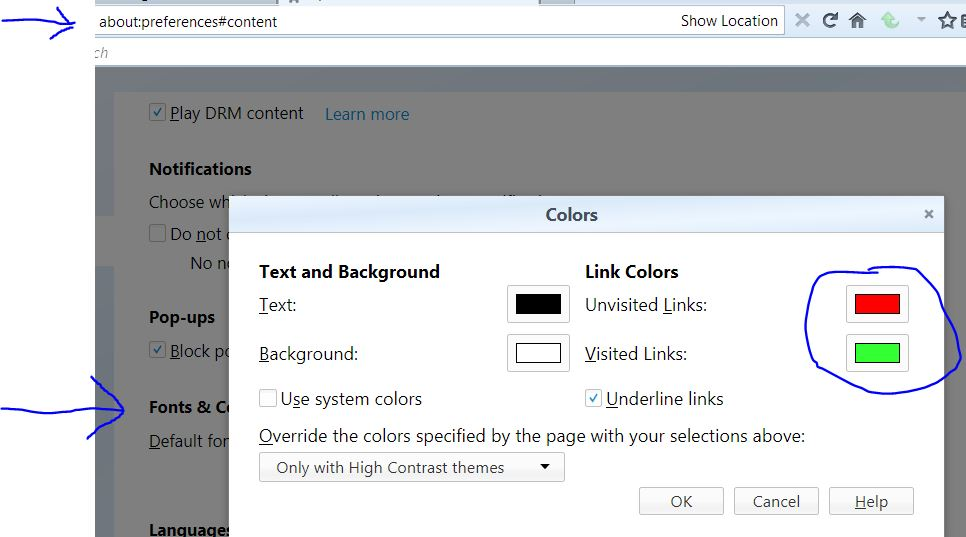
Type about:preferences#content<enter> in the address bar. Across from fonts and colors, press the Colors button.
FredMcD said
Go to the Mozilla Add-ons Web Page {web Link} (There’s a lot of good stuff here) and search for what you want. Type about:preferences#content<enter> in the address bar. Across from fonts and colors, press the Colors button.
I have not found an add-on which marks a link site wide, only per page.
The basic settings of Firefox don't allow to mark visited sites either.
Does the menu look like this?
FredMcD said
Does the menu look like this?
Yes. But let's say I visit twitter.com/realDonaldTrump/. Then later on twitter.com or twitter.com/BarackObama will not be marked as visited, because it only marks webpages in a different color if visited, not websites.
Modificado por dieterk a
It's only the used link that is stored in the history. The 'visited' is only for the links you used, not the website.